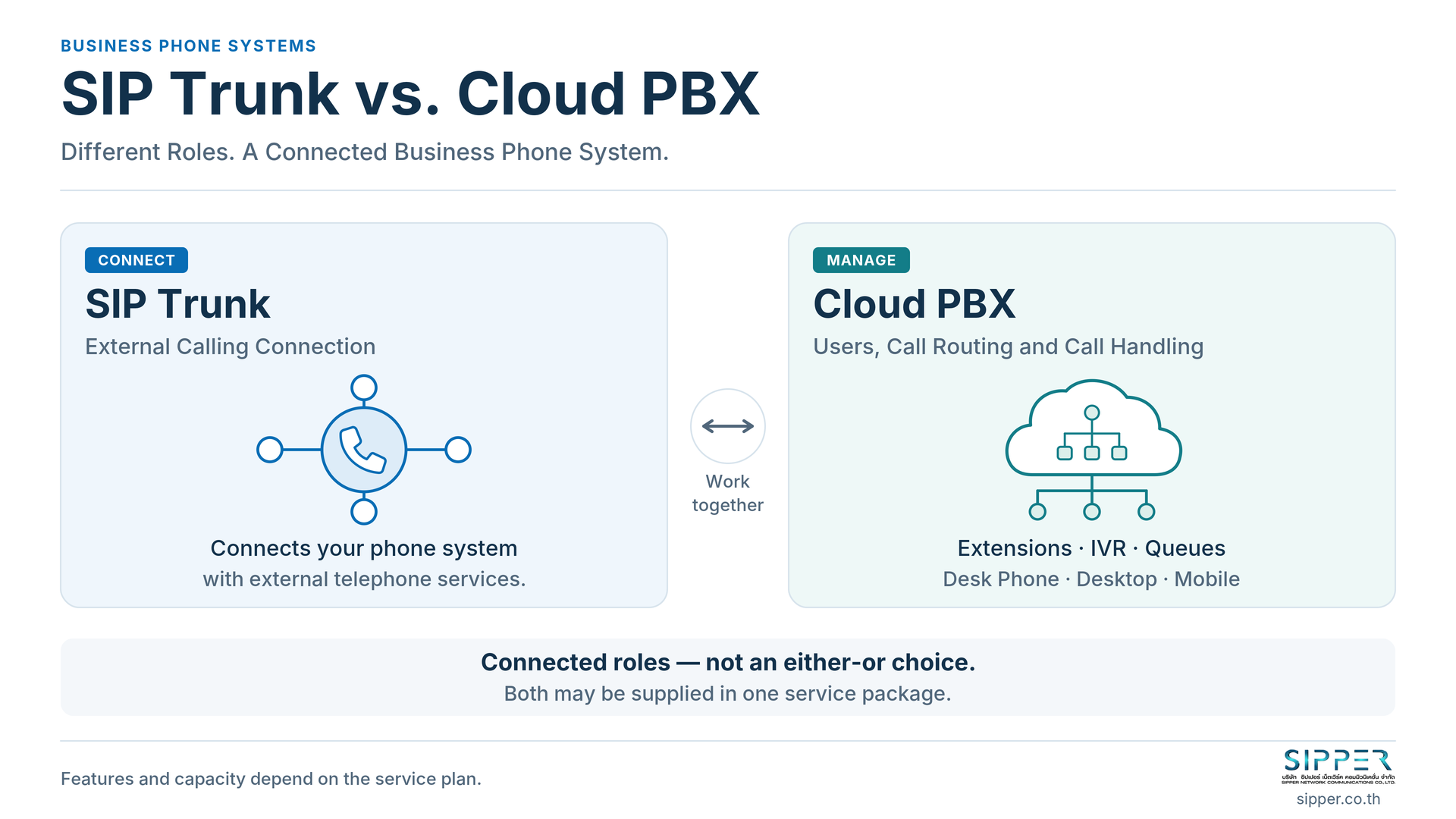
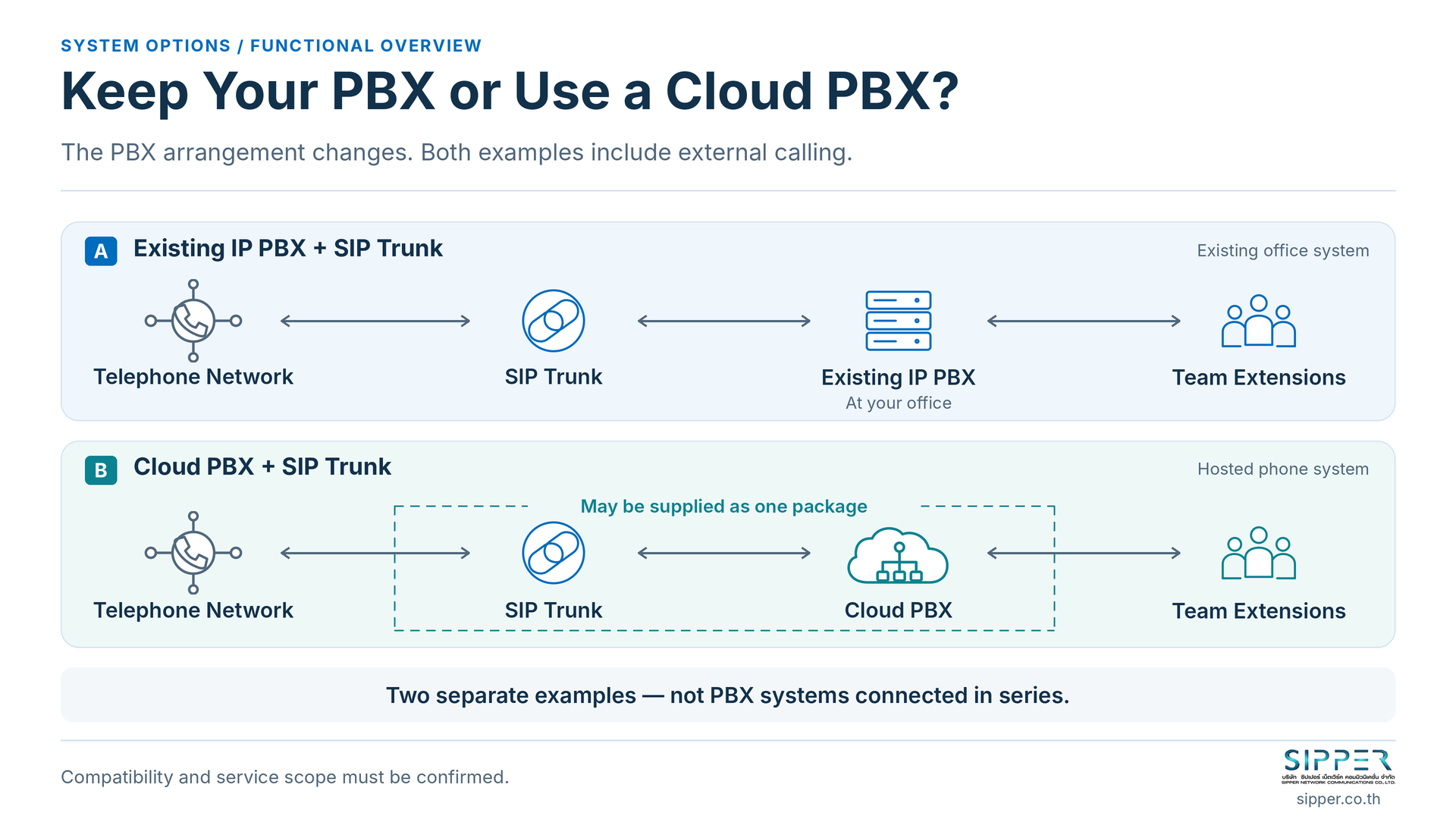
Figure 1 - SIP trunking connects external calls; a cloud PBX manages users and call handling. Both may be supplied in one package.
Although SIP trunks and cloud PBX services often appear in the same phone-system proposal, they serve different roles. A SIP trunk connects a compatible phone system to external telephone services. A cloud PBX manages your company’s users and call handling. One provides the external connection; the other decides how your business handles calls. (SIP trunk overview; cloud PBX overview)
Using both does not necessarily mean buying two separate subscriptions. SIPPER’s Cloud PBX service page states that SIP trunking is included. Start by checking what your business already has and what the proposed package covers, rather than adding another service automatically. (SIPPER Cloud PBX)
You do not need to decode a proposal alone. We at SIPPER help you review your existing setup, identify the missing pieces and plan the connection within an agreed scope.
What Is a SIP Trunk, and What Does It Do?
A SIP trunk provides an IP-based connection between your PBX - or another compatible calling platform - and a telephone service provider. It is not an internet access service, an employee calling app or necessarily a single physical cable. The receiving system might be an existing IP PBX, software PBX or cloud PBX; purchasing a hardware PBX is not automatically required. (SIPPER SIP Trunk)
DID, short for Direct Inward Dialling, refers to the service behind the business numbers people dial to reach your system. A number can lead to a department or an individual extension, depending on the routing. Numbers identify destinations; they do not, by themselves, describe concurrent calling capacity. (Yeastar: DID numbers)
A trunk alone does not automatically create employee accounts, greeting menus and queues. Those belong to the call-handling system or additional services in a bundle. Also, IP connectivity does not mean every segment crosses the public internet: Yeastar documents private-network peer trunks for a PBX and provider on the same private network. (Yeastar: trunk connection types)
What Is a Cloud PBX, and How Does It Manage Calls?
PBX means Private Branch Exchange: your company’s phone system. A cloud PBX runs on hosted infrastructure rather than on a PBX appliance in your office. It is a telephony system, not simply cloud storage. Hosting arrangements and management responsibilities depend on the service selected. (Yeastar Cloud PBX)
Typical functions include extensions, an IVR greeting menu, ring groups that ring selected users, and queues that hold callers for available agents. Hold, transfer and voicemail support everyday call handling. Employees may use compatible desk phones or desktop and mobile clients. Available features depend on the product, edition and package. (Yeastar: inbound destinations; extensions and clients; Cloud PBX features)
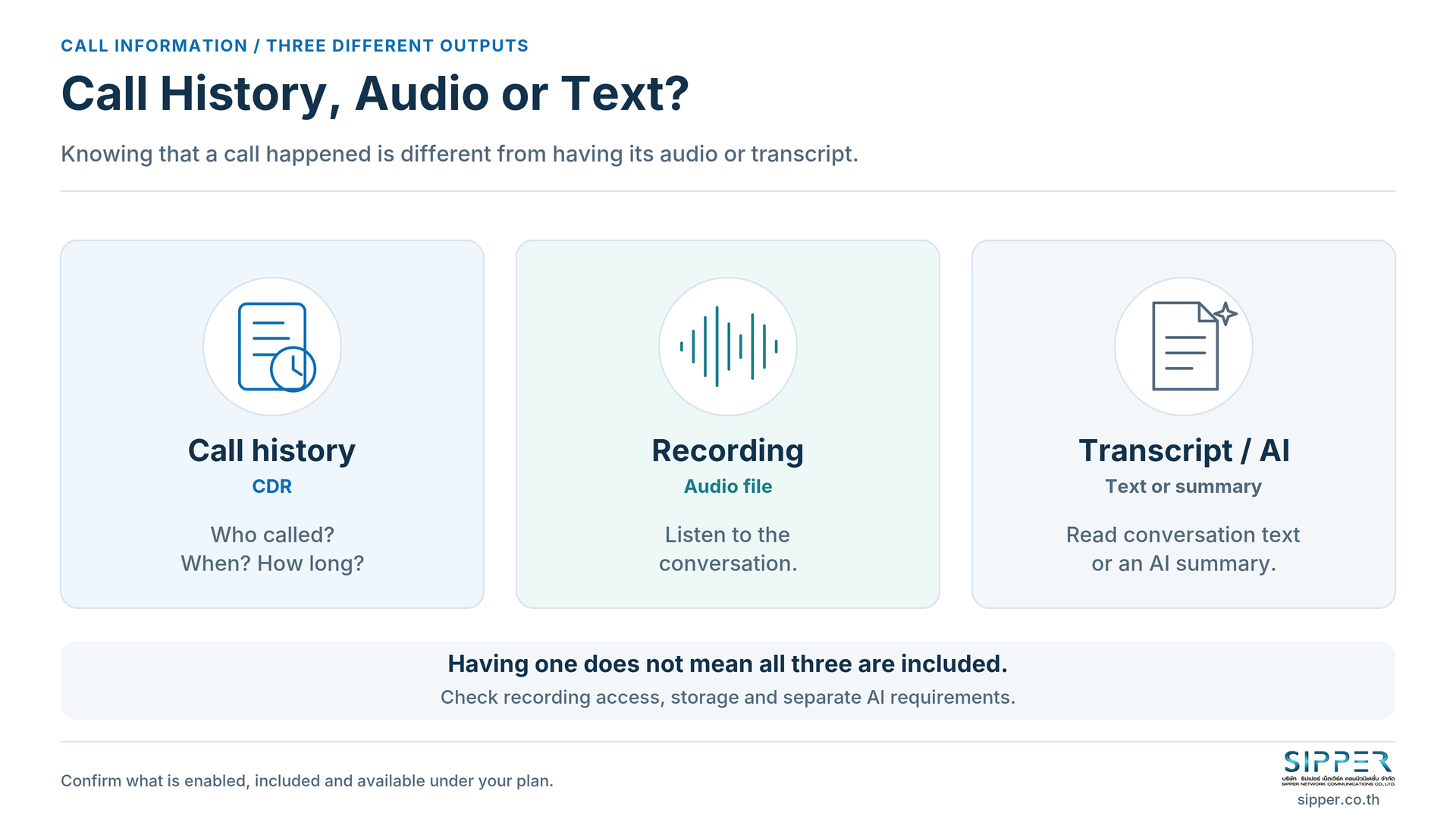
Keep three outputs separate: Call Detail Records (CDRs) describe call activity; recordings are audio files; transcripts and AI summaries process conversation content. Having call history does not establish that recording or AI is enabled. Yeastar documents recording permissions and separate AI requirements, including firmware and transcription capacity. Confirm what is activated and included in your service. (CDR; recording; AI transcription)
How Do SIP Trunking and a Cloud PBX Work Together?
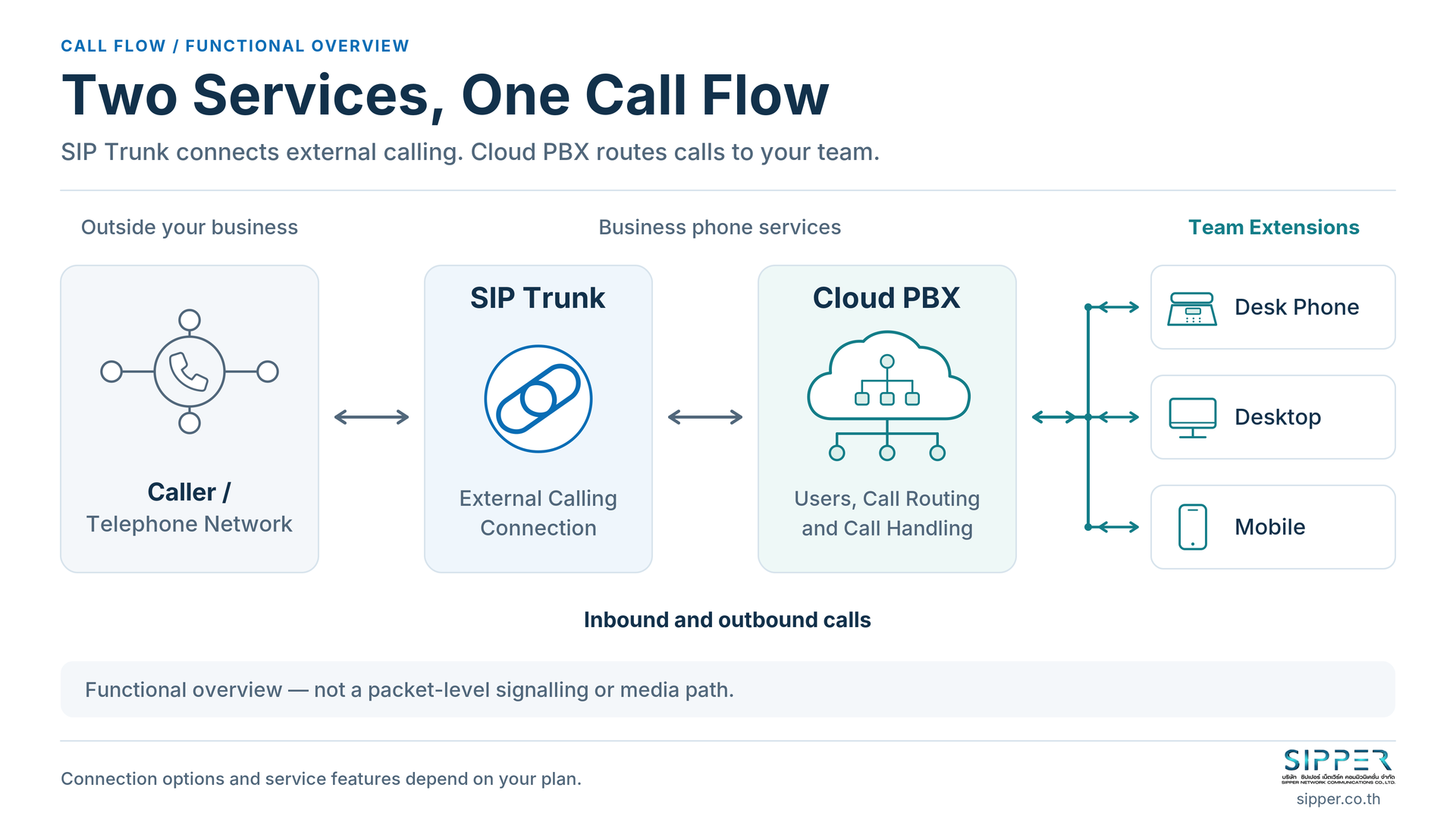
The functional relationship is:
External caller ↔ Telephone network ↔ SIP trunk ↔ PBX ↔ Users and devices
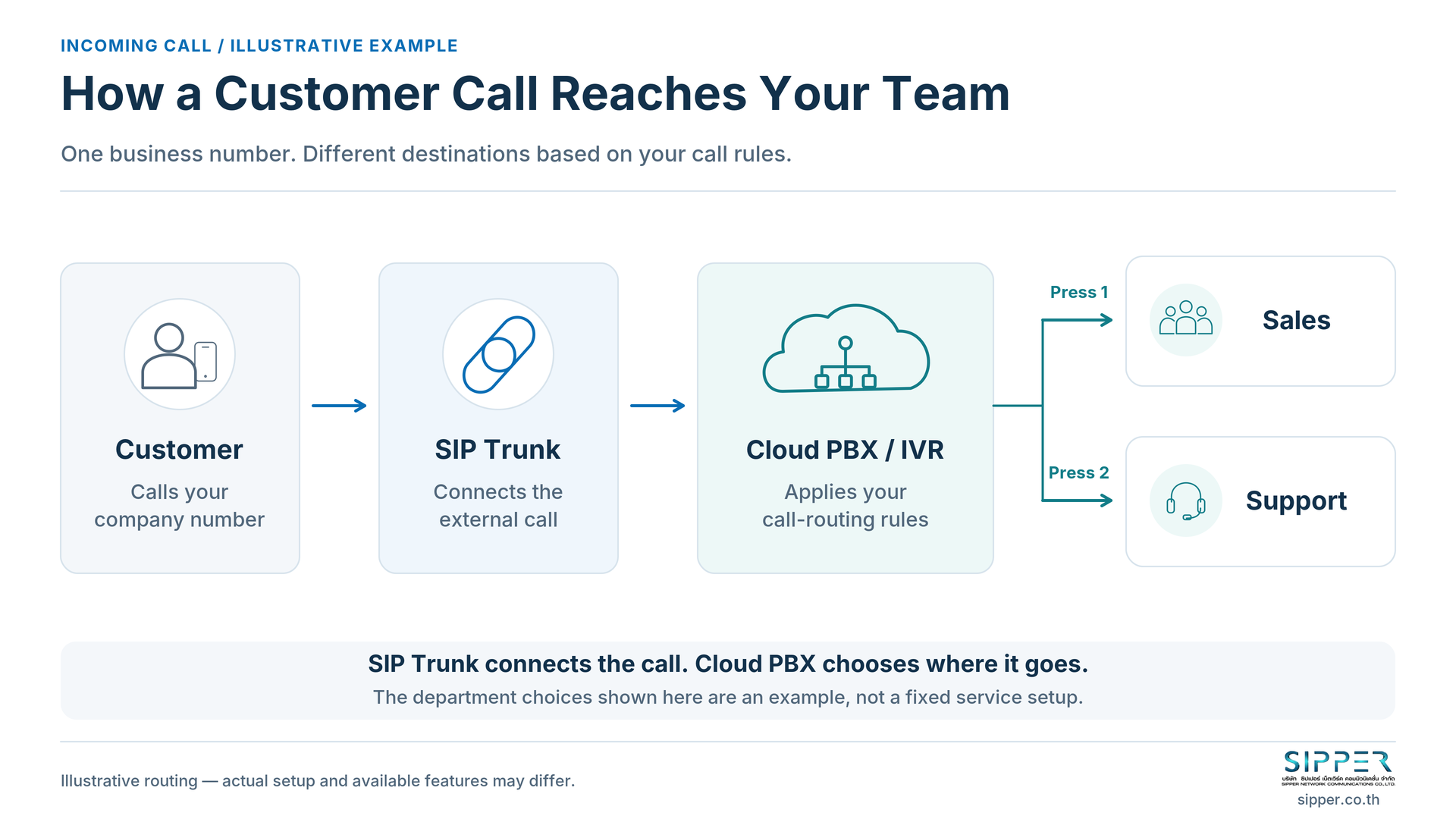
For an illustrative incoming call, a customer dials your company number. The telephone service delivers the call to the PBX, which applies the configured rules: play a menu, send the caller to a team or ring an extension. The employee answers on a connected device. (Yeastar: inbound routing)
For an outgoing call, the employee dials through the PBX. It checks the applicable routing and calling permissions before sending the call through the telephone service to the destination. (Yeastar: outbound routing)
This is a functional overview, not a packet-level diagram. It does not specify an identical path for call-control signalling and audio in every deployment.
Comparing Their Roles: External Calling vs. Call Management
This comparison separates the principal roles. It is not a complete feature list for every provider’s bundle.
On a small screen, scroll the table horizontally to read all columns.
| Topic | SIP trunk | Cloud PBX | Ask before buying |
|---|---|---|---|
| Main purpose | Connect external calling | Manage users and calls | Which part is missing? |
| What it connects or manages | Calling platform and telephone provider | Extensions, destinations and call rules | Who configures each side? |
| Systems needed alongside it | Compatible PBX or calling platform | Endpoints and external calling for telephone-network calls | What already exists or is bundled? |
| Users and devices | Not an employee-account system by itself | User accounts and supported clients/devices | Which devices and licences apply? |
| Numbers and capacity | Number services and external calling capacity | Routing plus its own system limits | What are the separate limits? |
| Call-handling features | May include provider-side services | Menus, groups, queues and other supported features | Which features are enabled? |
| Charges | Connection, numbers and calling under the offer | PBX plan, hosting and other scoped services | What is included or optional? |
| Support | Telephone-service and connection scope | PBX and application scope | Who handles cross-system incidents? |
Technical basis: trunks, extensions, inbound routing and PBX capacity. Commercial and support columns are questions to resolve in the quote, not a universal pricing model.
Two possible arrangements are existing IP PBX + SIP trunk and cloud PBX + SIP trunk. These are alternatives for the PBX role, not a requirement to connect both PBXs in series. SIPPER describes both existing-system connectivity and a bundled Cloud PBX arrangement. (SIPPER SIP Trunk)
Do 20 Employees Need 20 SIP Trunk Channels?
Not necessarily. Consider an illustrative requirement: 20 users, 2 business numbers and 5 concurrent external calls. These describe different units, not a SIPPER package or a sizing recommendation.
A user/extension identifies a person or internal destination. A device is the phone or client used to connect. A DID/business number is what external callers dial. Concurrent external calls/channels describe simultaneous external calling capacity. PBX and device session limits must also be checked. Calling minutes measure usage over time, not simultaneous capacity. (Extensions; DIDs; trunk limits; PBX capacity)
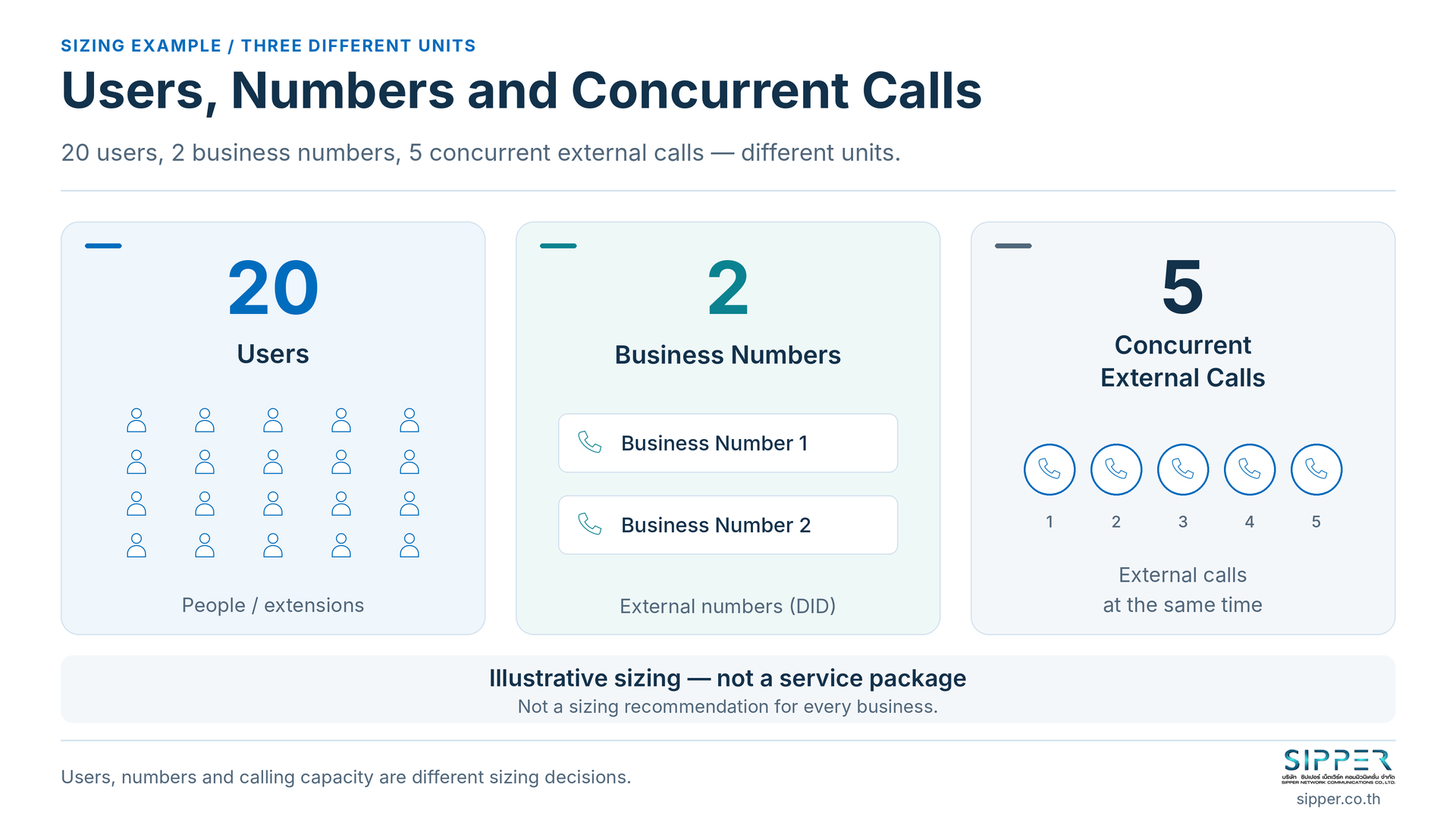
Adding users, numbers and channels are therefore different changes. Before accepting the example’s five-call capacity, review busy periods and how the service counts incoming and outgoing calls. Yeastar’s trunk settings distinguish restrictions on outbound calls from restrictions covering both directions. Those settings are not the carrier’s contractual allowance. (Yeastar: trunk call restrictions)
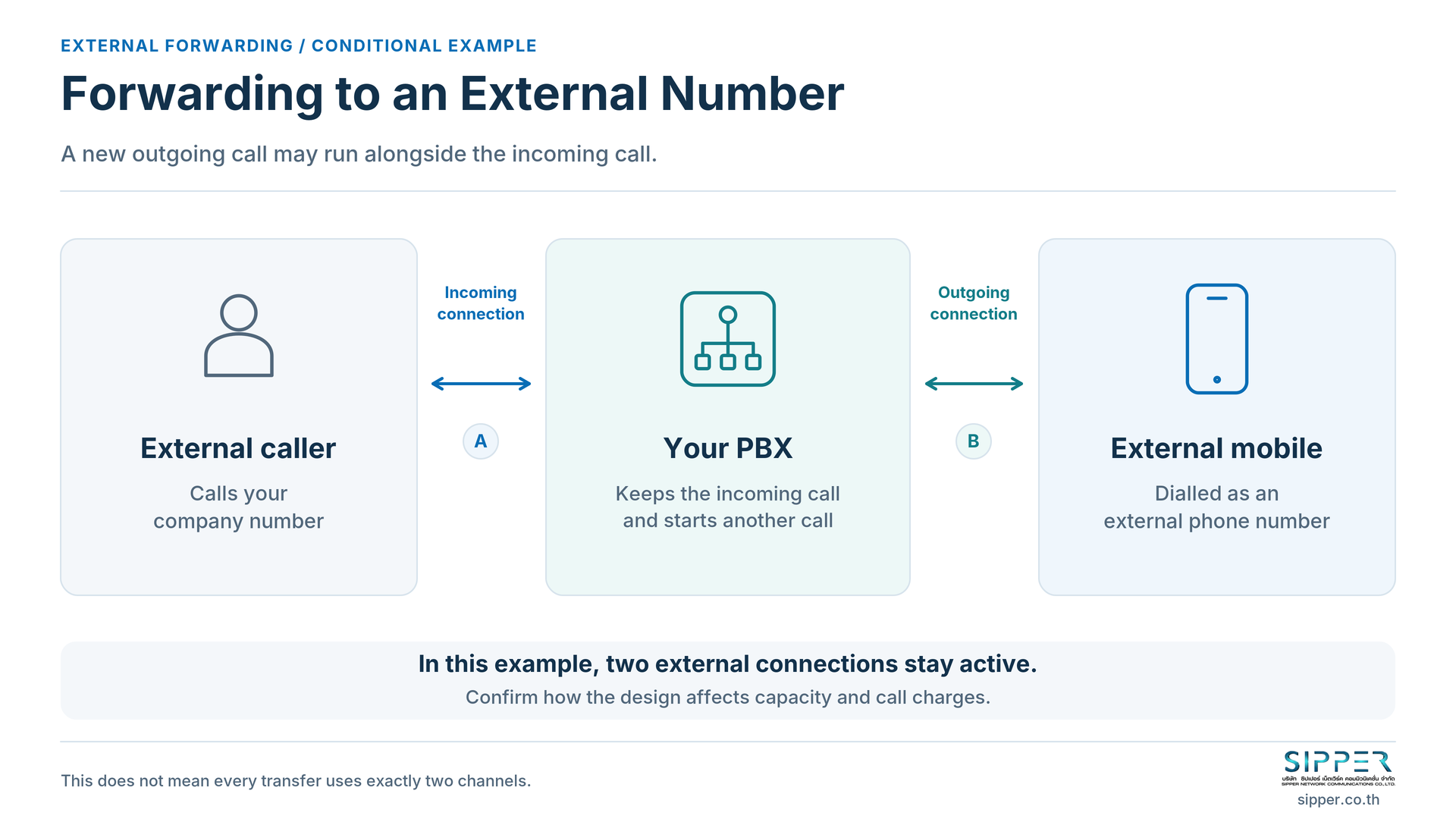
Also ask about forwarding or transferring to external numbers. If the design keeps an incoming connection and opens an outgoing connection simultaneously, there are two external call legs to account for. Confirm how that design affects capacity and charges; do not assume every transfer always consumes exactly two channels. This is a conditional design example, not a statement of SIPPER’s billing rules. (Call forwarding; call-leg records)
What Should Your Business Evaluate First?
The following are hypothetical situations, not customer case studies.
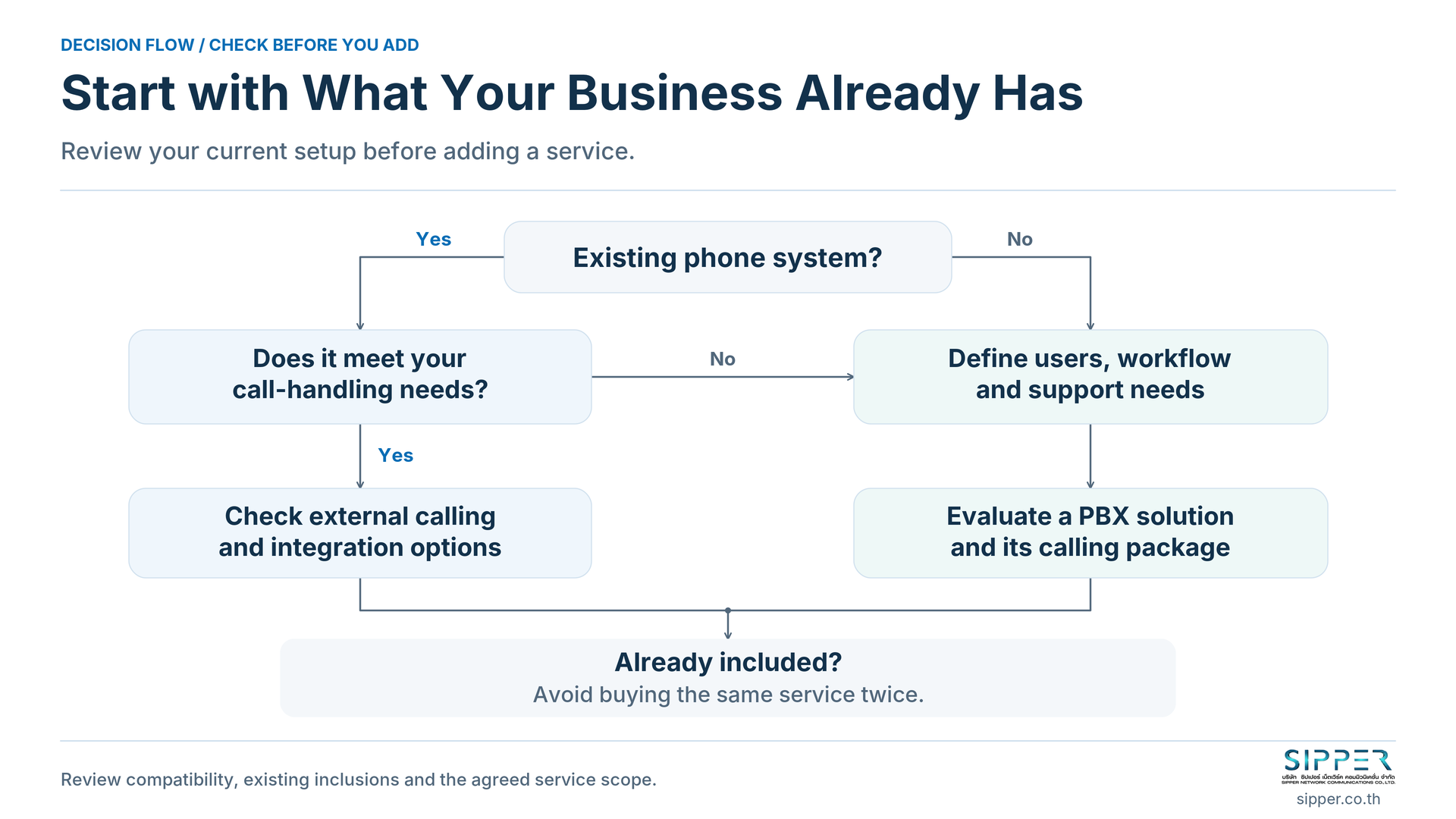
You Already Have a Suitable IP PBX
You have the call-handling system and need to add or change external connectivity. Start with a compatible SIP trunk. Ask your PBX administrator and SIPPER to check the model, firmware, licences, connection method, routing and required tests. Where the existing system lacks direct SIP support, assess a suitable gateway or an upgrade separately; do not assume every legacy PBX can be retained. (SIPPER: existing-PBX connectivity)
Further reading: When to replace a legacy PBX.
You Are Starting Without a PBX
You need both call handling and an external calling service. Define users, the main number, menus, distribution rules and the support owner first. Then evaluate a PBX solution and its calling package. Ask the provider which numbers, trunk capacity and calling allowance are included. Buying a trunk alone should not be treated as buying the complete workflow.
You Already Use a Cloud PBX
Check the existing package before adding another trunk. Identify what is missing, whether the platform and plan permit an external provider’s trunk, and who can change the configuration. Ask the current provider and proposed carrier to confirm compatibility and responsibilities. If the current service already covers the requirement, there may be nothing additional to buy. Yeastar’s documented trunk options do not prove that every hosted service permits customer-selected carriers. (Yeastar: trunk options)
Your Team Works Across Locations
Start with the clients, routing, connectivity and support your existing system offers. Remote work is not exclusive to cloud PBX: Yeastar documents remote access for on-premises and software deployments too. Have the PBX and network administrators compare supported options with SIPPER, including device access and testing outside the office. (Yeastar: remote access)
Your Calling Needs Are Still Simple
For one number reaching one recipient, first ask whether a basic calling or forwarding service meets the need. Confirm availability, calling charges, unanswered-call behaviour and who maintains the settings. A full contact centre is not the starting requirement merely because you need a company number.
How to Read Your Quote - and Check What Is Already Included
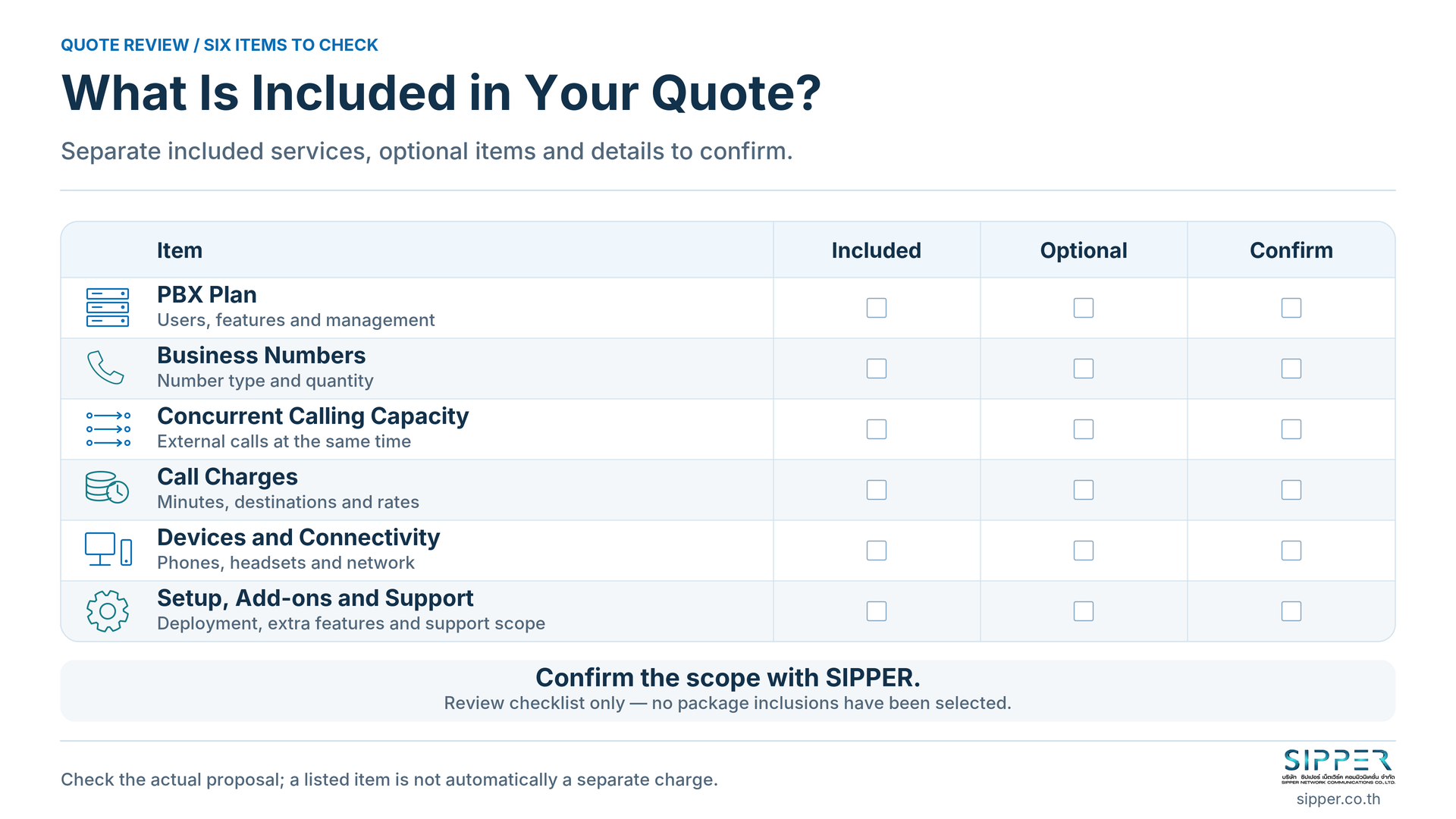
Ask for a scope that distinguishes included, optional and to be confirmed. Review the PBX subscription or hosting, business numbers, external capacity, calling allowance, devices, connectivity, setup, migration, training, add-ons and support. Also check contract duration, changes and cancellation.
Avoid assuming that every trunk is priced only per channel or every cloud PBX only per user. Compare the proposed services and responsibilities, not headline prices alone. Keeping an existing system still leaves maintenance work to account for; a hosted package should not be presumed cheaper without a like-for-like comparison.
Do You Need to Buy SIP Trunking Separately with a Cloud PBX?
Not when the required service is already included. SIPPER’s Cloud PBX page identifies bundled SIP trunking. Confirm the actual numbers, capacity, calling allowance and options in your quote; do not add a second trunk charge automatically. (SIPPER Cloud PBX)
Bundling does not mean unlimited numbers, unlimited simultaneous calls, free calls to every destination or every manufacturer feature. For recording, AI, customer relationship management (CRM) integration, application programming interfaces (APIs) or contact-centre tools, ask what is enabled, what capacity is supplied and what additional services are required. Product documentation is not your package entitlement. (Yeastar: recording permissions; AI requirements)
Further reading: What is Cloud PBX?.
What Should You Prepare, and How Can SIPPER Help?
You can start with the information you know:
- Current setup: PBX model, administrator, existing numbers and whether you need new numbers or a number-retention assessment.
- Daily work: users, peak simultaneous external calls, reception rules, business hours, devices, branches and remote work.
- Delivery scope: recording or integrations actually needed, data and security requirements, budget, support ownership and a suitable testing window.
Agree outbound calling permissions and what happens when nobody answers. Test connectivity and audio on the devices and networks employees will actually use; cloud hosting does not reconnect an offline endpoint. (Yeastar: endpoint status; call-quality metrics)
Ask where recordings and other data are stored and processed. Do not infer the country from “cloud”, or treat cloud hosting as evidence that your organisation’s PDPA requirements have been addressed. Make data handling and administration part of the scope review, not an assumption.
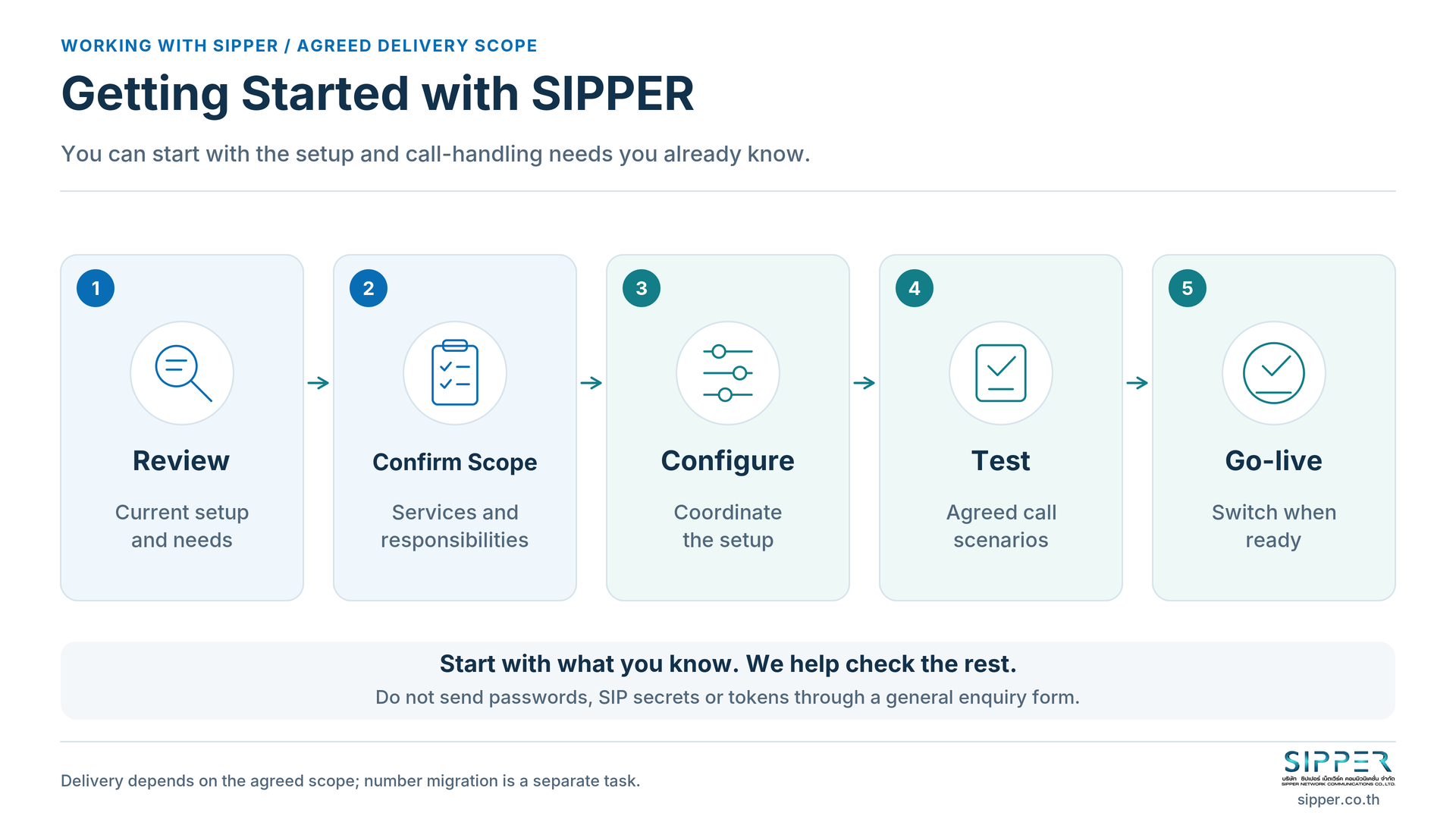
We help you work through Review → Confirm Scope → Configure → Test → Go-live: review the existing system, agree responsibilities, coordinate configuration, test the agreed call scenarios and confirm readiness before switching over. Number migration, where available, needs its own coordination; it is not completed merely by configuring a trunk.
You do not need all the technical settings before contacting us. Do not submit passwords, SIP secrets, tokens or customer records through a general enquiry form.
Frequently Asked Questions
Are SIP Trunking and Cloud PBX the Same Service?
No. They provide different principal functions, although a provider may package them together. (SIPPER Cloud PBX)
Can I Receive Calls on My Mobile with Only a SIP Trunk?
Not automatically. App-based calling needs a supported client and user setup; forwarding to a mobile number is a separate arrangement to check. (Extensions; forwarding)
Do I Need a Cloud PBX If I Already Have a PBX?
Not necessarily. Assess whether the existing system meets your requirements and supports the proposed connection before replacing it.
Do I Need to Buy SIP Trunking Separately with a Cloud PBX?
Check the bundle. SIPPER describes SIP trunking as included with its Cloud PBX; confirm the selected offer rather than assuming a second purchase. (Service details)
Can a Cloud PBX Use Another Provider’s SIP Trunk?
It depends on the platform, plan, provider policy and administrative access. Confirm these before ordering; documented technical support is not permission under every service contract. (Trunk options)
Do 20 Users Need 20 Numbers or Concurrent Channels?
No fixed one-to-one ratio applies. Assess public numbers and busy-period calling separately from user accounts. (DIDs; trunk limits)
Can I Keep My Existing Numbers and Phones?
Both need assessment. Check number eligibility with the provider; phone reuse depends on model and configuration compatibility. Outbound caller ID also requires provider support. No universal retention or caller-ID promise is implied. (SIPPER service details; phone configuration; caller-ID settings)
How Can We Start Without an In-house Telephony Specialist?
Describe the system you have and how your team handles calls. SIPPER can help identify the required services and coordinate the agreed setup and tests with your administrator.
Start with What You Have, Then Choose What You Need
Not sure whether you need a SIP trunk, a cloud PBX or a package that includes both? Tell us about your current system, users and call-handling needs. We will help you assess the required services and plan configuration and testing within the agreed scope.
Contact SIPPER · 02-098-9500 · sales@sipper.co.th