- Start with the business workflow, not the API
- Confirm your edition, plan and firmware before you design
- Choose the right integration method
- Map business requirements to PBX mechanisms
- Keep commands, events and voice on separate paths
- Three practical workflow designs
- From prototype to production
- CDR, recordings and analytics
- Security and access boundaries
- Planning your Yeastar integration with SIPPER
- FAQ
Yeastar Cloud PBX API Integration Guide
A practical guide to integrating Yeastar P-Series Cloud Edition with CRM, helpdesk and reporting systems: which API, event and voice paths to use, how to design reliable workflows, and which details to confirm in the official Yeastar documentation before you build.
Start with the business workflow, not the API
Most PBX integration projects begin with a short request such as "we need the Yeastar API". That sentence is too vague to design against. In practice, companies integrate a phone system to reach a small number of concrete business outcomes, and each outcome uses a different mix of interfaces, data directions and timing constraints.
Before anyone writes code, describe each workflow in three parts: the trigger (what happens on the phone system or in the business application), the data that has to move between systems, and the device or client that will actually carry the call audio. When those three answers are written down, choosing between a ready-made integration, a template-style configuration and custom middleware becomes a reasoned engineering decision instead of a guess.
Yeastar P-Series Cloud Edition exposes a developer API for commands and data queries, plus event delivery over WebSocket or Webhook. The PBX provides these building blocks; your application or middleware is responsible for business rules, user permissions, record matching in the CRM and the audit trail. Keeping that division of responsibility clear from the start avoids most of the rework we see in integration projects.
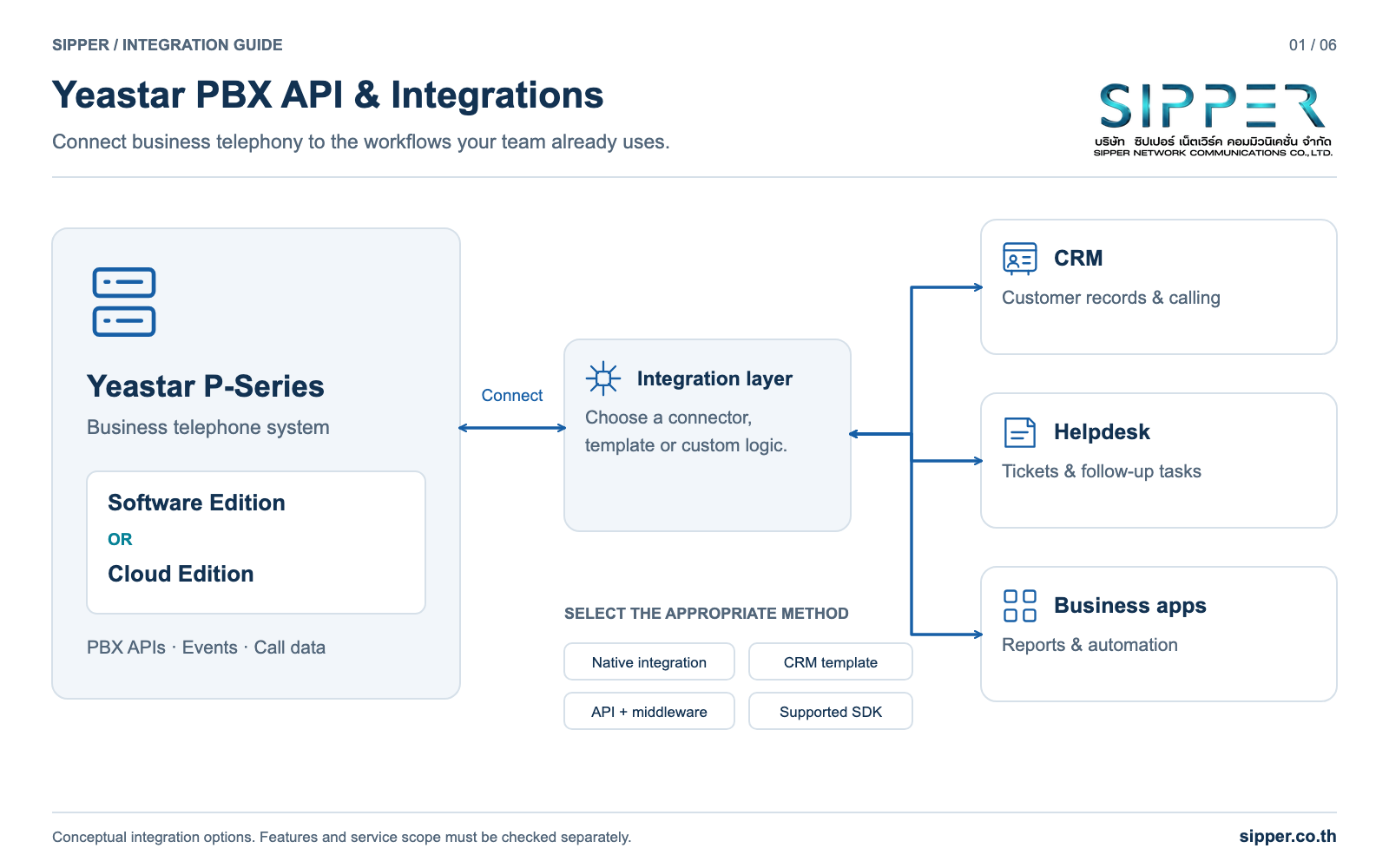
- Click-to-call: an agent clicks a customer number in the CRM and the PBX places the call through that agent extension.
- Screen pop: an incoming call triggers a CRM lookup so the agent sees the customer record while the phone is ringing.
- Automated follow-up: unanswered or abandoned calls create a callback task or ticket, once per call rather than once per ring.
- Reporting and analytics: CDR data feeds dashboards, service-level reports and optional downstream analysis.
Confirm your edition, plan and firmware before you design
Yeastar P-Series is sold in more than one edition, and hosting providers often describe several of them as "Cloud PBX". This guide is written for P-Series Cloud Edition and follows the Cloud Edition developer guide on help.yeastar.com. If your system runs a different edition, use the developer guide that matches it, because prerequisites and available interfaces can differ.
Whether an interface is available depends on three things at once: the edition, the firmware build currently running and the subscription plan. The official Cloud Edition interface summary lists capabilities such as CDR queries, recording download URLs, event subscriptions and WebSocket audio streaming settings, but that list describes the product, not your tenant. Do not assume every tenant can call every endpoint.
Some features carry their own explicit requirements. For example, Yeastar documents that the Linkus SDK for Web on Cloud Edition requires the Ultimate Plan and firmware 84.12.0.32 or later. The Linkus SDK is a separate product from the base developer API, so meeting the SDK requirements says nothing about other endpoints, and the reverse is also true.
The safest approach is to write an inventory before the design review: edition, firmware build, plan, whether API access is enabled for your tenant, and which features your hosting provider allows you to use. Then check each planned interface against the current official page for that interface.
| Item to confirm | Where to check | Why it matters |
|---|---|---|
| Product edition | PBX web portal and your provider contract | Each edition has its own developer guide and prerequisites |
| Firmware build | PBX system information page | Some interfaces and event features list a minimum firmware on their official page |
| Subscription plan | License or subscription details | Several capabilities are plan dependent; the Linkus SDK for Web requires the Ultimate Plan |
| API access status | PBX integration or API settings | Credentials and allowed sources must be configured before any request succeeds |
| Provider permissions | Hosting provider or reseller | A hosted tenant may restrict which settings you can change |
| Each planned interface | Current Yeastar Cloud Edition developer guide page | Availability and parameters can change between releases |
Choose the right integration method
There are several ways to connect Yeastar P-Series to business software, and the right one depends on how much custom logic the workflow needs. Choosing the lightest method that still meets the requirement keeps the system easier to operate and upgrade over the long term.
Existing integrations come first. Yeastar publishes integration guides for a number of third-party applications. If one already covers your CRM or helpdesk, test it against your real workflow, including custom fields, ownership rules and ticket creation, before deciding to build something new.
Custom middleware is the right answer when the workflow needs business logic the PBX cannot express on its own: matching a caller across several databases, deduplicating follow-up tasks, enforcing per-team permissions or keeping an audit trail. The middleware receives PBX events, calls the PBX API when it needs to act, and talks to downstream systems through their own APIs.
An embedded calling client is a separate decision. If agents must talk inside a web application without a desk phone or separate softphone, look at the Linkus SDK. As noted above, the Linkus SDK for Web on Cloud Edition has its own plan and firmware requirements, so check them before committing to this design.
| Method | Best fit | What you maintain | Watch out for |
|---|---|---|---|
| Existing integration from the official list | A supported CRM or helpdesk with standard workflows | Configuration and user mapping | Gaps in custom fields or company ticket rules |
| Custom middleware using the API and events | Proprietary CRM, multi-system lookups, custom follow-up rules | Service code, hosting, monitoring and upgrades | Needs a named owner for long-term operation |
| Embedded Linkus SDK client | Calling inside a web application without a separate phone | Front-end integration and SDK updates | Separate plan and firmware requirements |
| Reporting export only | Dashboards and service reports without real-time actions | Scheduled import and reconciliation | Not suitable for screen pops or live call handling |
Map business requirements to PBX mechanisms
Once the workflows are written down, map each requirement to a PBX mechanism and to the logic your own software must add. The PBX supplies commands, events and records; it does not know which CRM user owns which account, which calls deserve a ticket or who may listen to a recording.
The table below is a planning aid, not a list of guaranteed endpoints. Confirm the exact interface for each row in the Cloud Edition developer guide that matches your firmware and plan.
| Business requirement | PBX mechanism to look for | Logic your software adds | Confirm before building |
|---|---|---|---|
| Start a call from the CRM | Documented call-control interface | User-to-extension mapping, authorization and result tracking | Interface availability, caller permissions and outbound routing |
| Show caller details on an incoming call | Event subscription over WebSocket or Webhook | Number normalization, CRM lookup and delivery to the right agent | Event subscription options for your tenant |
| Create callback tasks for missed calls | Completed-call information and CDR | Whole-call evaluation, assignment and duplicate prevention | Queue, transfer and voicemail behavior in your call flows |
| Produce custom call reports | CDR query interface | Import, reconciliation and time zone handling | Fields available on your firmware |
| Attach recordings to CRM activities | Recording download URL interface | Authorized retrieval and controlled storage | Recording policy and how long the URL stays valid |
| Live dashboards of extensions or queues | Relevant queries and event subscriptions | Dashboard state and refresh logic | Which objects your plan lets you query |
Keep commands, events and voice on separate paths
A telephony integration uses three different paths, and most confusing bugs come from mixing them up.
Commands and queries travel over the REST-style API. Your backend sends a request, such as asking for CDR data or, where the documentation supports it, asking the PBX to place a call, and receives a response. A successful response means the PBX accepted the request; it does not describe what happened on the call afterwards.
Events travel from the PBX to your software. Yeastar documents two delivery options for Cloud Edition: a WebSocket connection that your software keeps open, and Webhook delivery where the PBX sends HTTP requests to an endpoint you publish. Events describe state changes, and they are how your software learns that a call is ringing, answered or finished.
Voice travels separately again. Call audio flows between the carrier, which reaches the PBX through a SIP Trunk, the PBX itself and the calling device used by the agent, such as an IP phone, the Linkus app or an embedded client. The API and event channels carry text data, not live conversation audio.
Keeping these paths separate makes troubleshooting faster. If a CRM button starts a call but the agent hears silence, the API command worked, and the investigation belongs with SIP Trunk routing, network address translation or firewall rules for media.
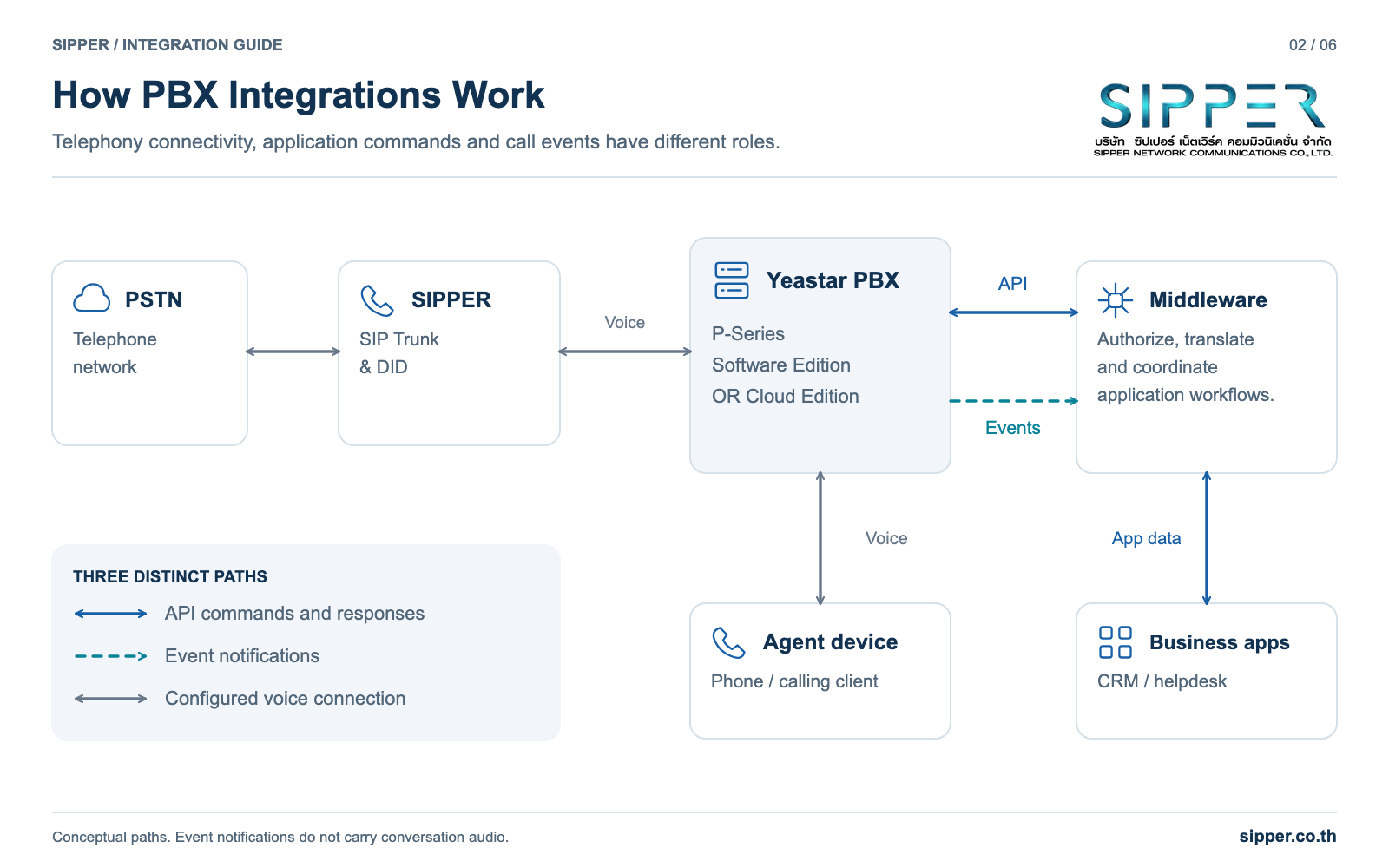
- Command path: backend to PBX API, request and response.
- Event path: PBX to backend, over WebSocket or Webhook.
- Voice path: carrier, SIP Trunk, PBX and calling device.
- After-call data: CDR and recordings, retrieved through their own interfaces.
Three practical workflow designs
The following reference designs show how commands, events and CRM state fit together. They describe architecture and failure handling rather than vendor-specific payloads, so take field names and parameters from the current official developer guide.
Design 1: Click-to-call from the CRM
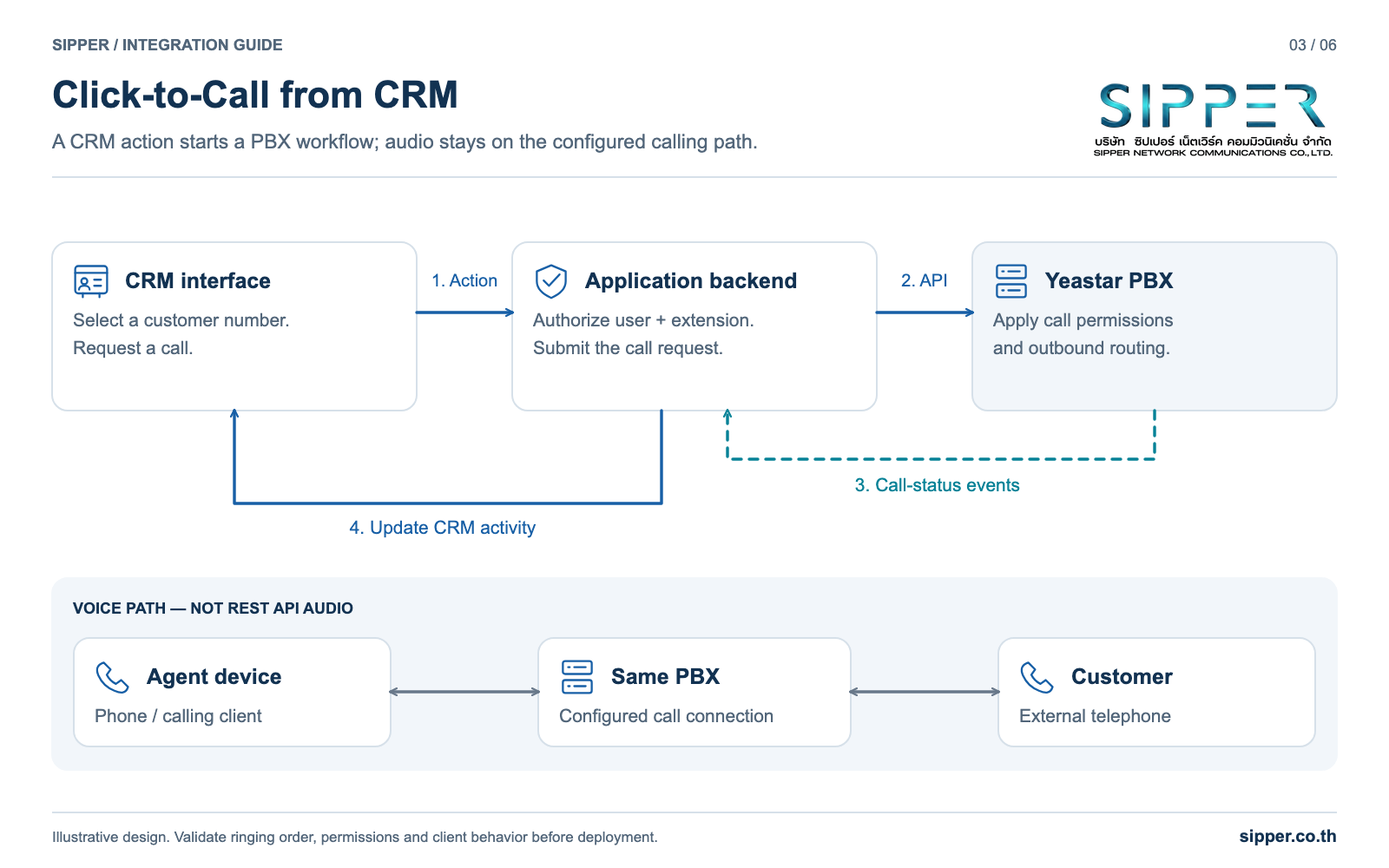
An agent clicks a customer number in the CRM. The browser does not call the PBX directly. It sends the request to your backend, which checks that the user may place the call, looks up the extension assigned to that user and then calls the documented call-control interface on the PBX.
Depending on the device and PBX configuration, the agent device typically rings or answers first, and the PBX then dials the customer over the outbound route, usually a SIP Trunk. The backend stores the call reference returned by the PBX so it can match later events to the CRM activity.
Treat the API response as "request accepted", not "customer answered". Mark the activity as connected only when an event confirms the call state. Never retry a dial request blindly after a timeout: the first request may already have reached the PBX and the customer phone may be ringing. Check the call state or your own request log before sending another request.
Design 2: Incoming call screen pop
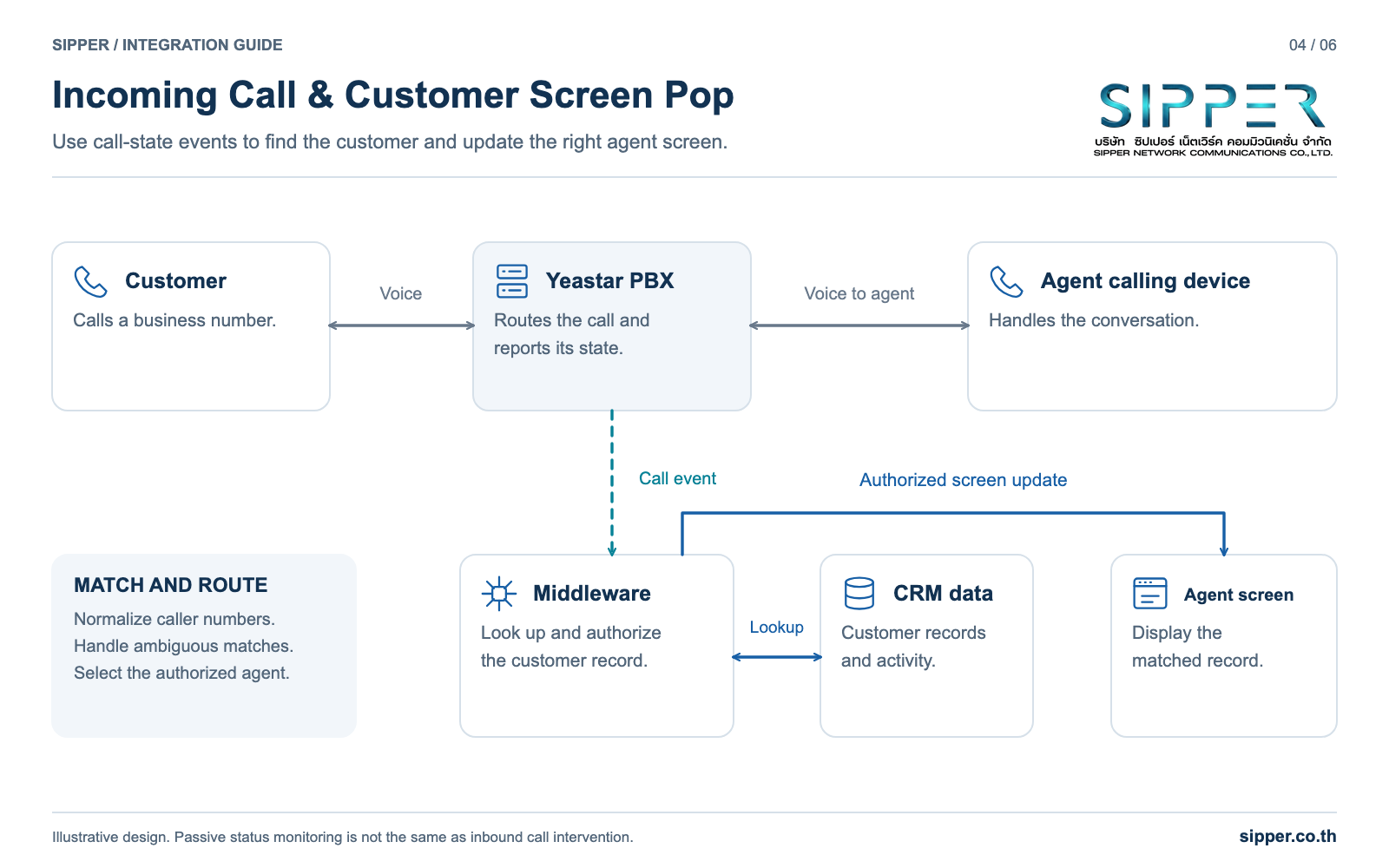
When a call arrives on a company DID, the PBX routes it according to your inbound rules and emits call events. Middleware that subscribes to those events receives the caller number and the target of the call.
The middleware normalizes the number, for example by handling country codes and trunk prefixes consistently, searches the CRM and pushes the result to the browser session of the agent whose phone is ringing. It should handle withheld numbers, unknown numbers and numbers that match several records, where a short selection list is better than guessing.
When a call is transferred, update the screen for the new agent rather than the original one. After the call ends, write the final outcome to the CRM activity and, if your policy allows it, link the recording.
Design 3: Missed-call follow-up without duplicate tickets
A callback workflow should evaluate the whole call, not individual ring attempts. If a queue call rings one agent without an answer and is then answered by a colleague, the first agent missed a ring but the customer was served. Creating a ticket for that ring only produces noise.
Wait until the call has finished, then evaluate the completed-call information or the CDR for the overall outcome across all legs. Create at most one task per call by storing the PBX call identifier on the task and checking it before creating another. This also protects you if the same notification is processed twice for any reason.
- Evaluate the call once, after it ends.
- Key follow-up tasks on the PBX call identifier.
- Route the task to the right team using queue or DID context.
From prototype to production
A prototype that works on a developer laptop is not yet an integration. Production readiness is mostly about authentication, event reliability and failure handling.
Authentication and access tokens
For Cloud Edition, Yeastar documents that the API access token expires after 30 minutes and that the token request must include a User-Agent header. The token response also reports the expiry time in seconds through the access_token_expire_time field. Your backend should read that value and obtain a new token before the current one lapses, following the official authentication guide.
Enable API access in the PBX, create the credentials and restrict where requests may come from if your deployment supports it. Store client credentials and tokens only on the backend, never in browser code, mobile apps or source control.
Reliable WebSocket event handling
The Cloud Edition event guide states that an idle WebSocket connection disconnects after 60 seconds and that the access token used to establish the connection expires after 30 minutes. A heartbeat keeps the connection active. Build a client that sends heartbeats, detects disconnection, reconnects with a fresh token and backoff, and resynchronizes state after reconnecting.
Assume that some events can be missed while a connection is being re-established. For anything that matters to the business, such as a callback task, reconcile against records like the CDR rather than relying on a single live event.
Verifying Webhook requests
For Webhook event push on Cloud Edition, Yeastar documents a generated secret and an X-Signature header. The receiver computes an HMAC-SHA256 of the raw request body with the secret, Base64-encodes the result and compares it with the header. Verify against the raw bytes before any JSON parsing or reformatting, and use a constant-time comparison.
The Webhook page also lists a firmware prerequisite, so confirm that your tenant meets it. Do not assume the same behavior on other editions or older firmware.
Acknowledge valid requests quickly and move business processing to a job queue. Make handlers idempotent and do not assume any particular redelivery behavior; reconcile important outcomes from records instead.
Testing failure paths early
Test the uncomfortable cases before launch: busy extensions, invalid numbers, abandoned queue calls, transfers, network interruptions, token expiry during a long-running session and recordings that are not yet available. Standardize time zones and pagination handling across systems, and keep a mapping between identifiers used in events and those used in CDR records.
CDR, recordings and analytics
CDR and recordings are separate data assets with different sensitivity and different interfaces. CDR entries are structured records about completed calls, suitable for reports, service-level tracking and follow-up rules. Recordings are audio files that may contain personal data and need stricter access control.
The Cloud Edition interface summary lists both CDR queries and a recording download URL interface. Fields, versions and filters can vary with firmware, so check the official CDR page for your build before designing reports, and expect that records created on older firmware may not contain every newer field.
Treat recording download URLs as short-lived, and check their validity on the official page rather than hard-coding an assumption. Do not place a raw download link in a CRM page that many users can open. A safer pattern is for the backend to retrieve authorized recordings, store them in controlled storage with a retention policy and link the stored copy to the CRM activity with proper permissions.
Analytics such as transcription or sentiment scoring can be built as an optional external step for recordings your policy allows you to process. Treat it as a separate project with its own data protection review, and confirm current Yeastar feature availability for your plan before relying on any built-in capability.
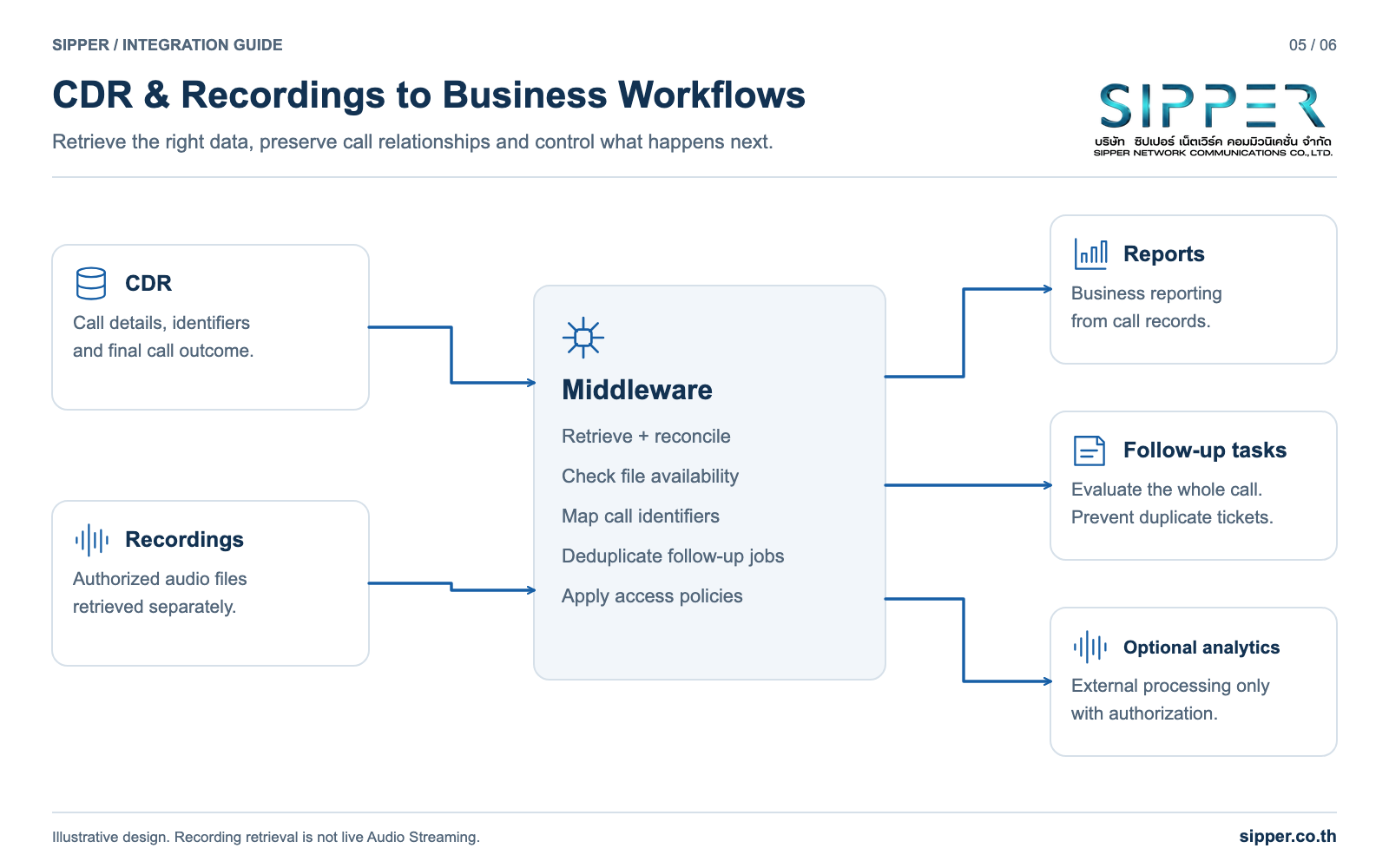
| Data asset | Typical use | Access control | Design note |
|---|---|---|---|
| CDR | Reports, service levels, follow-up rules | Reporting and operations roles | Fields can vary by firmware; reconcile regularly |
| Call recording | Quality review, disputes, training | Restricted by team and purpose | Retrieve through the backend and store under a retention policy |
| Live call events | Screen pops and live dashboards | Middleware only | Not a system of record; reconcile with CDR |
| WebSocket Audio Streaming | Real-time processing where your plan provides it | Dedicated receiving service | Check availability and settings in the official guide |
Security and access boundaries
Treat every PBX integration as a security boundary. The PBX can place calls that cost money and can expose conversations and customer numbers, so the integration deserves the same care as a payment system.
Keep PBX credentials, access tokens and Webhook secrets on the backend only. The browser should talk to your own backend, which checks who the user is and what they may do before it calls the PBX. Use HTTPS and WSS with valid certificates for all integration traffic.
Separate permissions by role. An agent interface needs to place calls from that agent extension and nothing else. It should not be able to download arbitrary recordings or change PBX settings. Reporting tools should read data, not issue call commands.
Plan for abuse as well as mistakes. Limit outbound call volume from automated components, restrict destinations where the business allows it, alert on unusual call patterns and log every command your backend sends to the PBX, together with the user who triggered it.
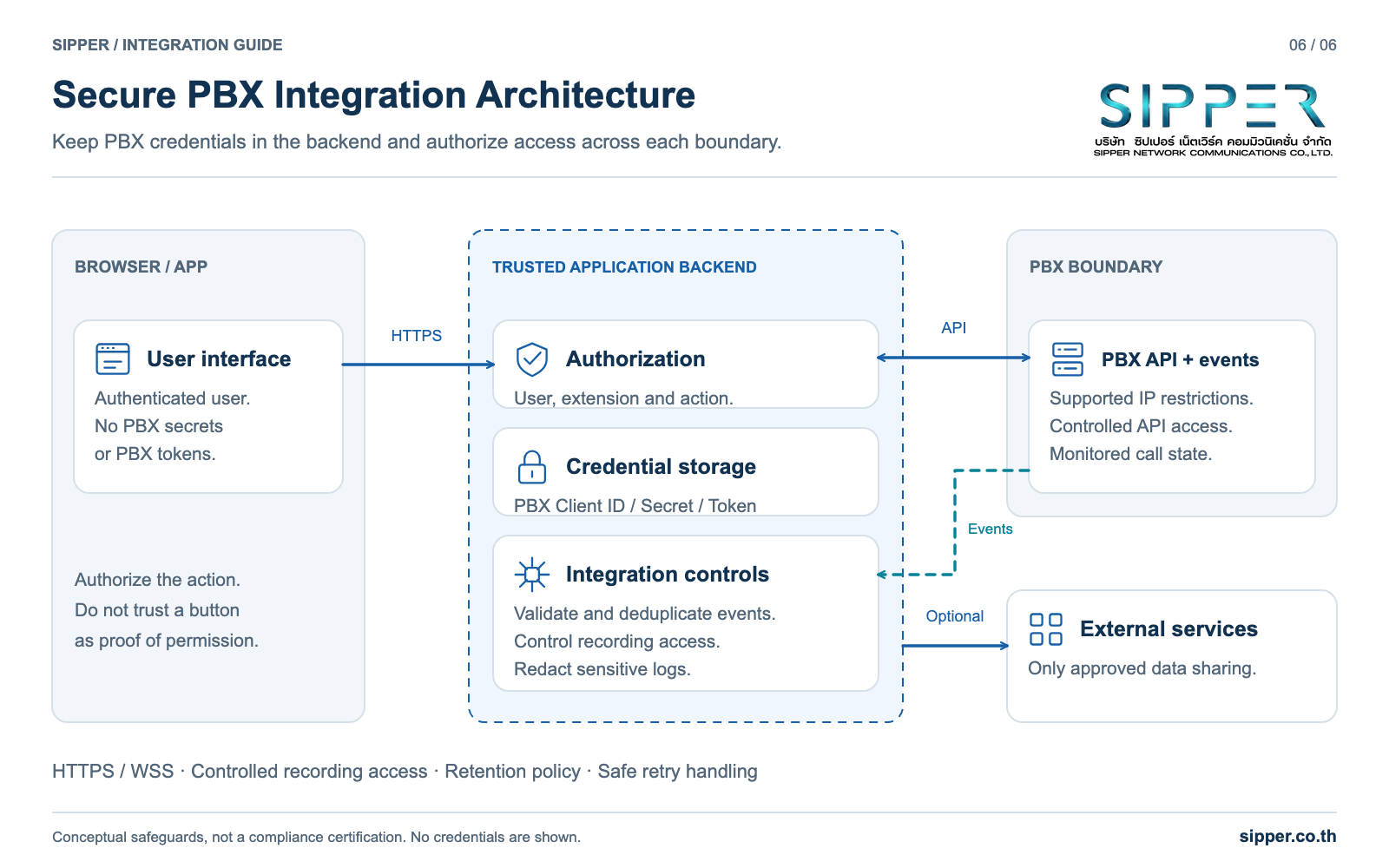
- Secrets stay in the backend and are rotated when staff or vendors change.
- Every PBX command is authorized and logged per user.
- Webhook requests are verified with the documented X-Signature check.
- Recordings are retrieved and shared only through controlled storage.
- Outbound automation has rate limits and alerts.
Planning your Yeastar integration with SIPPER
SIPPER provides enterprise SIP Trunk and DID services in Thailand. In a typical design, SIPPER supplies the connection to the public telephone network, Yeastar P-Series handles extensions, call routing and PBX features, your CRM holds customer data, and middleware carries your business rules.
Before a project starts, agree on the edition, firmware, plan, the workflows in scope, who builds the middleware and who operates it after launch. These answers usually decide cost and timeline more than the code itself.
To discuss a Yeastar integration or SIP Trunk design, call 02-098-9500 or email sales@sipper.co.th. Share the CRM or application you use, the workflows you want, the number of users and the expected call volume. Please do not send API secrets or passwords in an initial inquiry.
Frequently Asked Questions
Ready to deploy?
SIPPER designs, deploys, and maintains end-to-end enterprise phone systems. Start with a free quote.