1. The Speed Test Looks Great. So Why Are Customers Asking You to Repeat Yourself?
Picture an office where large files download quickly and websites load without hesitation. Then a customer calls. Words disappear, a voice turns robotic, and both sides start repeating themselves. Someone runs a speed test and asks: “We have plenty of bandwidth. How can the phone system be struggling?”
This is an illustrative scenario, not a SIPPER customer case study. It captures a useful distinction: moving a large amount of data and maintaining a clear conversation are different requirements.
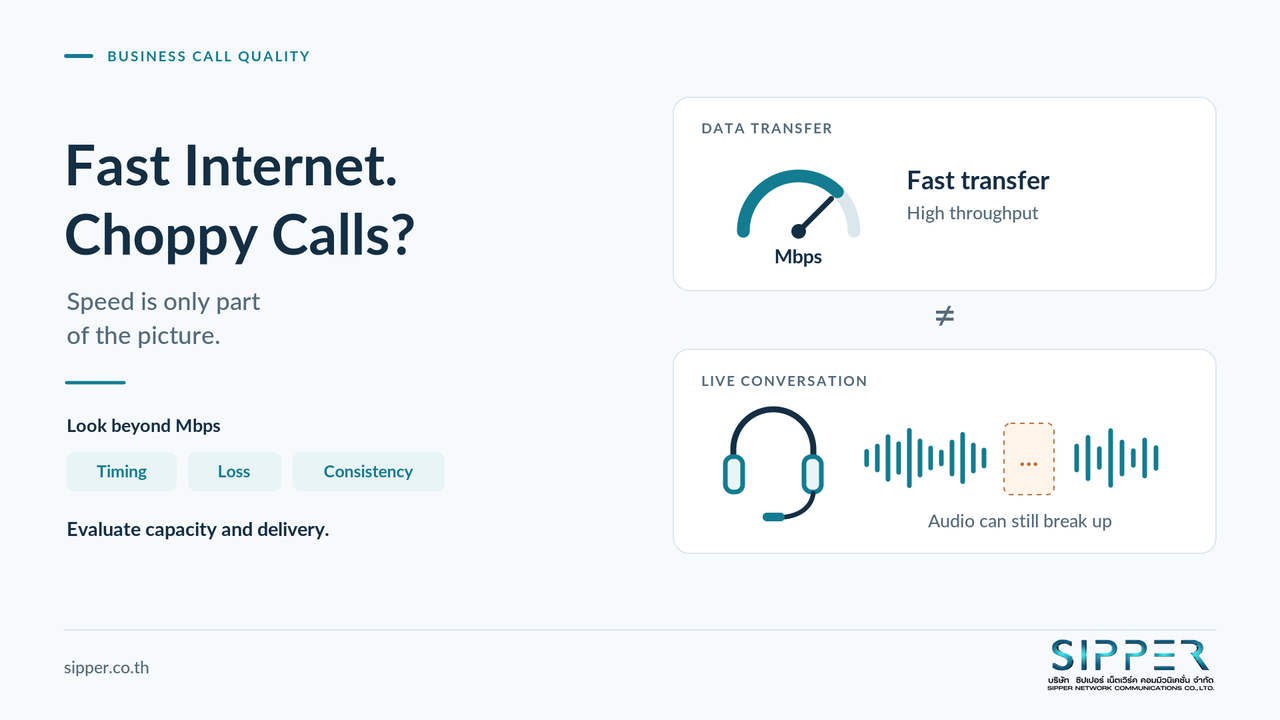
A fast connection can move a lot of data. A good phone call also needs that data to arrive on time and consistently. Delay, uneven packet delivery, and lost packets can affect a conversation even when the headline transfer rate looks healthy. [1]
VoIP (Voice over Internet Protocol) carries speech over IP networks, including deployments using IP phones, softphones, and cloud telephone systems. The practical response is not automatically a faster internet plan or a different phone provider. Start by identifying where the affected call encounters difficulty.
Figure 01 · Fast Internet. Choppy Calls? Transfer speed is only part of call quality. Timely, consistent delivery matters too.
2. Bandwidth and Call Quality Are Not the Same Thing
Capacity versus delivery
Think of bandwidth as the capacity of a connection, while throughput is the transfer rate actually achieved during a measurement. A speed test samples that performance under particular conditions; it is not a certificate for every application and destination. Cloudflare's network-quality assessment, for example, considers several measurements beyond upload and download speed. [14]
The metrics behind a conversation
| Metric | Plain-English meaning | What to investigate |
|---|---|---|
| Bandwidth / throughput | Capacity / achieved transfer rate | Whether enough capacity is available in both directions |
| Latency | Time taken to travel between points | Noticeable conversational delay and people talking over each other |
| Jitter | Variation in packet arrival timing | Uneven delivery that may exceed the receiver's buffering capability |
| Packet loss | Packets missing at the receiving point | Missing syllables or broken audio, particularly during bursts |
| Consistency | How conditions change over time | Whether acceptable averages hide short disruptions |
The timing and loss distinctions matter: high latency primarily makes conversation less immediate; it does not automatically mean audio will break up. [1] [2] [3]
Why live audio cannot simply wait
A receiver uses a jitter buffer, a short holding area that smooths uneven packet arrivals before playback. It can compensate only within limits. Packets that arrive too late may be discarded, and adding more buffering also adds waiting time. [2]
Capacity still matters. Voice bandwidth planning must account for the codec, packetization interval, protocol overhead, and simultaneous calls - not just the encoded audio bitrate. [4]
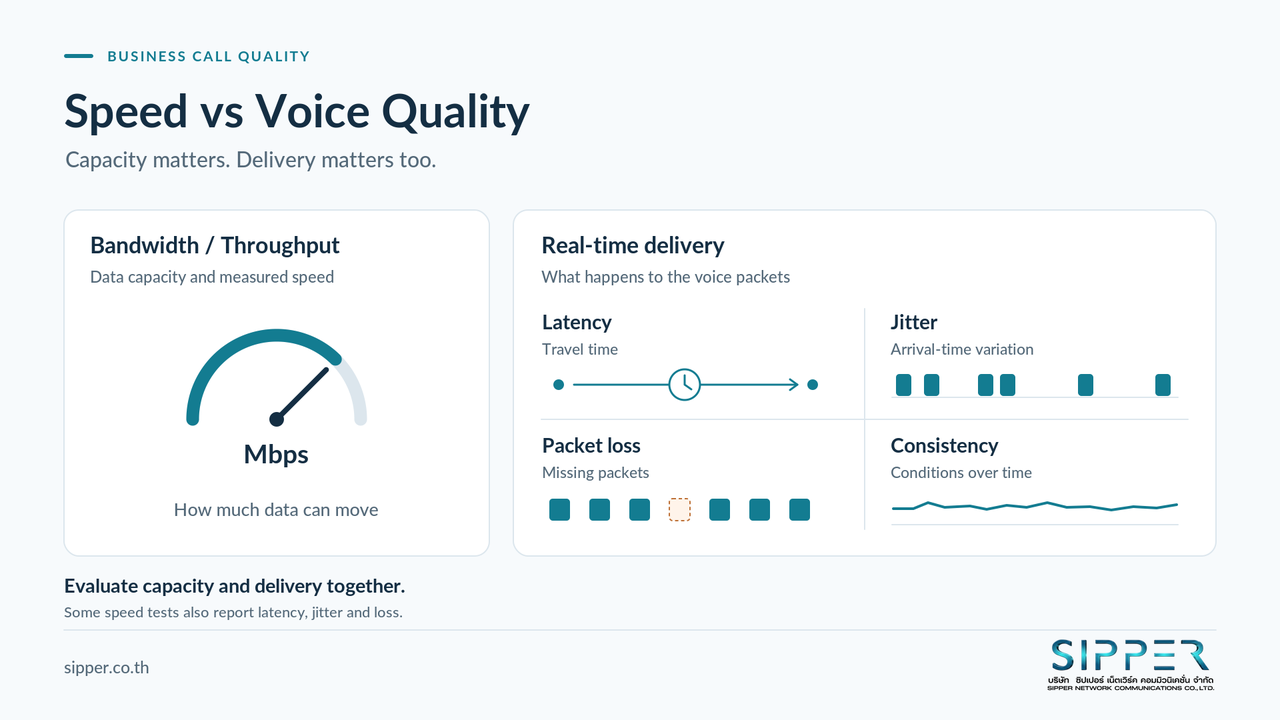
Figure 02 · Speed vs Voice Quality Capacity and delivery quality should be evaluated together, not treated as alternatives.
3. Where to Look When Calls Break Up
Congestion and bufferbloat
When traffic reaches a bottleneck faster than it can leave, packets queue. File uploads, backups, video streams, or cloud-connected CCTV are worth checking when disruptions coincide with busy periods. Bufferbloat means excessive buffering creates avoidable delay; it is not simply another name for slow internet. [5] [6]
Wi-Fi and the local network
Wireless coverage, interference, channel contention, and access-point placement all deserve attention. A connection icon or strong signal alone does not establish that the wireless network is suitable for real-time media. Properly designed Wi-Fi can support calling; it should neither be blamed automatically nor treated as equivalent to a controlled wired test. [7]
Routers, firewalls, NAT, and routing
Check router workload and queues, not just the speed printed on its ports. Hardware that struggles under load remains a potential constraint. [14]
NAT, which translates network addresses, and firewall rules must accommodate the actual signaling and media connections. Reachability problems may require a different investigation from intermittent audio degradation. [8]
SIP ALG is an application-aware function that can modify SIP-related traffic. Such helpers can interfere with other NAT-traversal mechanisms. Treat the setting as something to validate against the deployed system - not a switch to change blindly. [9]
Codecs and interoperability
A codec encodes and decodes audio. In SDP offer/answer, systems need compatible media formats; having none in common can cause a stream or session to be rejected rather than merely sounding choppy. [10]
Transcoding converts between formats. It can be a legitimate part of interoperability, not proof of a fault. Identify where conversion occurs and examine that component's capacity and configuration. [11]
Devices and software
Headsets, microphones, IP phones, softphones, client versions, and audio drivers belong in the investigation too. [12] For a computer-based phone, compare calls with and without heavy workloads and check whether CPU pressure coincides with the symptom. Test the endpoint rather than assuming every audio problem is a network problem.
Upstream networks and cloud paths
The route beyond your office matters. For Microsoft 365, network design guidance emphasizes efficient connectivity to the service rather than unnecessary centralized detours. [13] A branch, VPN route, or remote party's access network is therefore a useful comparison point - not automatic evidence against one provider.
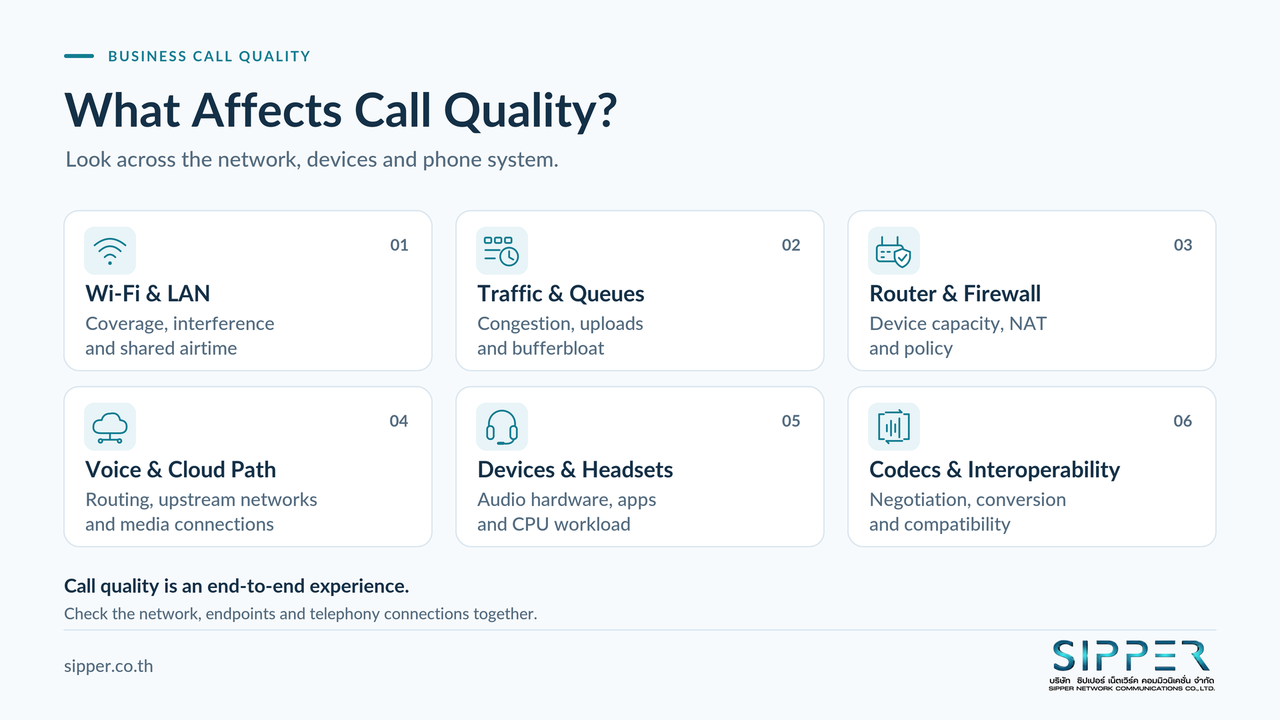
Figure 03 · What Affects Call Quality? Investigate the network, endpoints, and telephony connections rather than judging calls by internet speed alone.
4. Why a Speed Test Is Only Part of the Picture
Look beyond the biggest numbers
Speed tests are useful. Some, including Cloudflare's, display latency, jitter, and packet loss as well as throughput. The mistake is reading only download and upload, then declaring the voice path healthy. [15]
Compare idle and busy conditions
Loaded latency means delay measured while traffic is actively using the connection. It helps frame a different question from peak throughput: does the connection remain responsive while it is busy? [14]
Arrange controlled comparisons during a test call: first with normal background activity, then with an approved upload or backup workload. Record what changes. Do not saturate a production connection while colleagues are handling important calls.
Measure the relevant journey
A test to one server at one time does not establish the behavior of a different path later. Match the test device, connection type, destination where practical, and problem period. Use actual call telemetry alongside general network tests; a successful ping by itself does not test audio capture, codec negotiation, or the call's complete media path.
5. Follow the Voice Path, Not Just the Internet Connection
A simplified example is:
IP phone or softphone ↔ LAN or Wi-Fi ↔ router/firewall ↔ internet ↔ voice platform or media edge ↔ remote network ↔ remote party.
This is a conceptual journey, not a deployment diagram for every organization. A PBX - the system that manages business phone calls - or Session Border Controller (SBC) may sit at a different point. The media may use a direct route, a relay, or a processing service depending on the architecture. [8] [16]
Signaling establishes and controls a call. Media carries the sound. In SIP systems, RTP commonly carries media, with SRTP used where secured media is negotiated. The signaling and media routes need not match. Teams clients also should not be described as ordinary SIP phones: Microsoft documents different client signaling and SIP use in particular integrations. [16]
Ask two separate questions: did the call connect correctly, and did audio travel correctly in each direction?
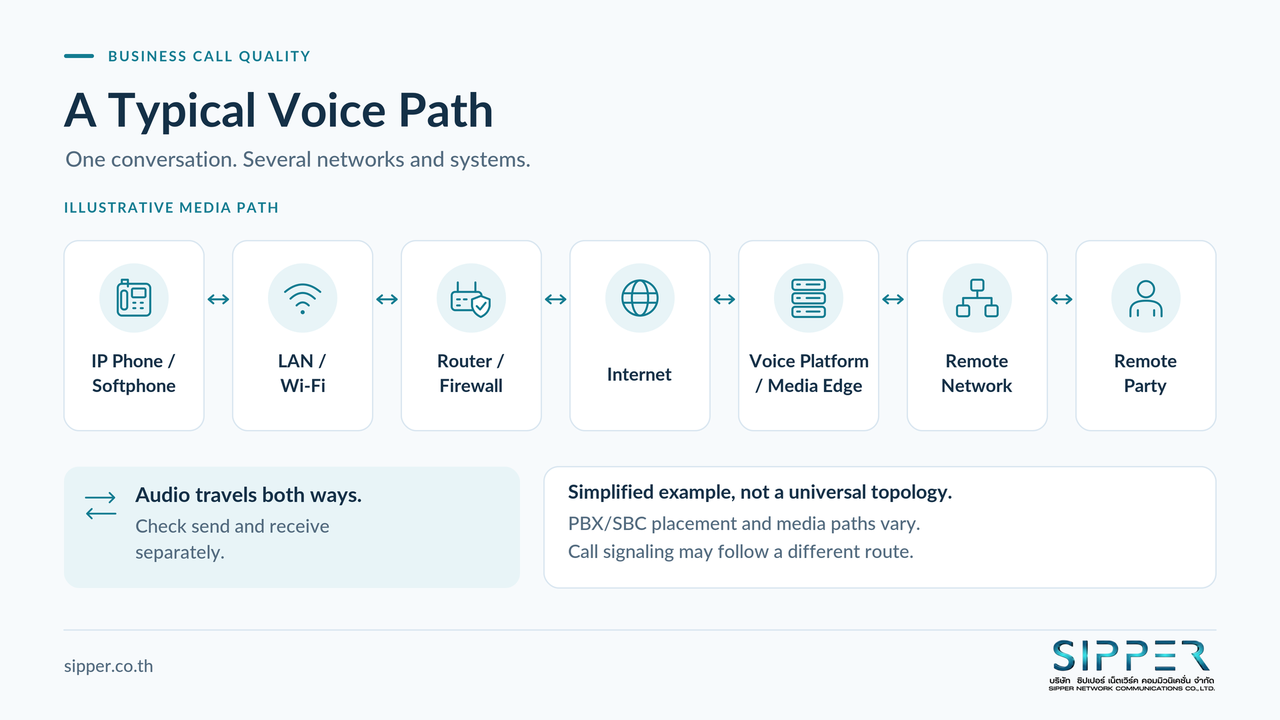
Figure 04 · A Typical Voice Path Simplified example. PBX/SBC placement and actual media paths vary by architecture and may differ from signaling paths.
6. Six Workplace Scenarios - and What to Investigate
These hypothetical examples suggest tests, not diagnoses.
| Scenario | Areas worth checking | A useful first comparison |
|---|---|---|
| Office Wi-Fi calls break up intermittently | Wireless conditions and local contention | Same device and call type over Ethernet |
| Audio worsens during uploads, backups, or CCTV cloud transfers | Upload utilization and queueing | Approved workload paused versus active |
| Only a busy softphone computer has problems | CPU pressure, audio device, and client | Same headset on another supported computer |
| One branch struggles while others sound normal | Branch LAN, firewall, and upstream path | Affected and unaffected branches calling the same destination |
| A home worker reports unpredictable quality | Shared usage, Wi-Fi, and access connection | Wired test under documented household usage conditions |
| Teams or Cloud PBX struggles despite spare bandwidth | Endpoint, media route, and per-call metrics | Compare affected calls by user, site, and connection type |
Change one variable at a time where possible. Moving to Ethernet while replacing the headset and switching providers may improve a call, but it will not tell you which change mattered.
These checks draw on the network, device, and queueing factors discussed above. [5] [7] [12]
7. A Practical Checklist Before You Upgrade Your Internet Plan
Define the scope and direction
- Record affected users, sites, devices, timestamps, and timezone. Separate one-off incidents from repeatable patterns.
- Distinguish broken audio, delayed conversation, total one-way silence, failed setup, and unexpected disconnection.
- Record who hears the problem. “The customer cannot hear us clearly” is more useful than “outgoing calls are bad.”
- Compare internal and external calls, remembering that internal calls may still use a cloud media path.
“Calling out” describes call initiation; it does not identify which audio stream is impaired. Inspect send and receive directions separately. [12]
Compare network conditions
- Test the same endpoint on LAN and Wi-Fi. Compare affected periods with a known-good baseline.
- Check upload and download utilization, interface errors or drops, queues, and router/firewall workload during the incident.
- Measure latency, jitter, and loss. Check whether configured QoS actually classifies and prioritizes the intended traffic.
Label one-way delay and round-trip time (RTT) correctly; they are different measurements. Do not assume halving RTT gives an exact one-way value. Avoid a universal pass/fail threshold without specifying the platform and measurement method.
Inspect the device and the call
- Swap the headset or endpoint in a controlled test; review client versions, drivers, and CPU workload.
- Check codec negotiation and the SIP/RTP or platform-specific media path, including NAT, firewall, routing, and SIP ALG behavior.
- Save relevant call IDs and available media statistics. RTP's companion reporting protocol, RTCP, can provide reception information such as packet loss and interarrival jitter. [17]
For Teams, use the admin center's meeting and call troubleshooting views where available; telemetry varies by session and endpoint type. [18] Examine brief loss bursts and late-packet discards as well as averages. A packet counted as received can still arrive too late for useful playback. [3]
Share only necessary diagnostic details through authorized channels. Use agreed test calls rather than collecting customer audio by default.
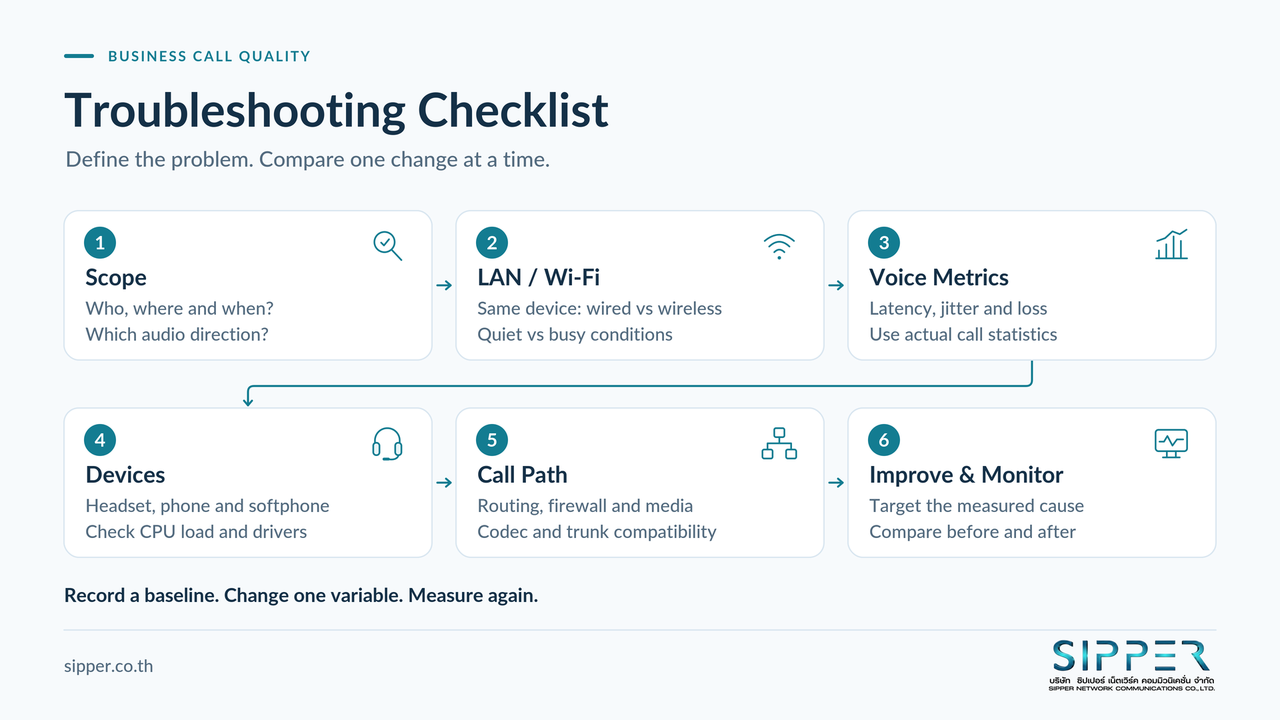
Figure 05 · Troubleshooting Checklist Define the problem, compare one variable at a time, and measure before and after changes.
8. Improve the Right Part of the System
Start with controlled comparisons
For important fixed calling positions, evaluate a wired connection before replacing the entire phone system. Where mobility matters, review wireless coverage and capacity rather than assuming users must permanently abandon Wi-Fi. [7]
If an upload test reliably reproduces the problem, evaluate rescheduling or limiting background transfers. If a device substitution resolves it, investigate that endpoint first. Keep a record of the original settings and the result of each change.
Use prioritization and queue management deliberately
Quality of Service (QoS) gives selected traffic preferential treatment where the network implements that policy. It does not manufacture capacity or guarantee how the public internet treats packets. Verify classification, marking, and queue behavior across the managed path. Prioritize the relevant media stream, not just call-setup messages. [1]
A voice VLAN can help organize and apply policies, but separation alone does not reserve capacity. Traffic shaping and queue-management approaches, including appropriately supported Active Queue Management (AQM), may help at a diagnosed bottleneck. They require design and validation, not an arbitrary rate limit applied to every call. The queue policy for best-effort data can differ from that of an engineered priority voice queue. [5] [6] [19]
For Teams and other cloud services, follow the platform's media-path guidance rather than inserting unnecessary inspection or shaping devices into the path. [16]
Validate interoperability and measure again
Review codec compatibility, conversion points, and trunk configuration with the relevant parties. Where SIP ALG is suspected, plan a limited enable/disable comparison according to vendor guidance, with rollback available. Do not disable the firewall or broadly expose the PBX as a troubleshooting shortcut.
Add bandwidth when measurements demonstrate a capacity shortfall. Size for concurrent calls, both directions, overhead, other applications, and operating headroom - not one idealized call. [4]
Repeat comparable tests after changes and retain a monitoring baseline. Success means fewer reported disruptions and improved call evidence, not merely a larger speed-test number.
9. How SIPPER Can Support the Conversation
SIPPER provides SIP Trunk and DID services in Thailand. For an organization reviewing call quality, the discussion should cover how the network, endpoints, PBX, and trunk work together - not assume a trunk replacement will fix every issue.
Contact SIPPER to discuss your calling setup, network readiness, PBX and SIP Trunk connectivity, and an appropriate assessment or improvement scope. Bring examples of affected calls and a simple description of the sites and equipment involved.
The next step depends on the findings and agreed scope. Some issues may require coordination with the internet provider, network team, PBX vendor, or endpoint support team rather than a change to one service alone.
10. Better Calls Need More Than a Bigger Mbps Number
More bandwidth can be useful when capacity is the constraint. It is not a substitute for understanding the problem.
The better question is: where does this conversation lose timing, continuity, or clarity? Examine the network path, the devices, and the telephone system together. Compare evidence before spending, and verify improvements under realistic conditions.
Recurring call-quality problems? Talk to SIPPER about your business calling setup and discuss an assessment suited to your environment.
References
Technical sources checked on September 23, 2026. Platform documentation has its own scope; it is not a universal quality guarantee.
- Microsoft Learn - Implement Quality of Service (QoS) in Microsoft Teams
- Cisco - Understanding Jitter in Packet Voice Networks
- IETF / RFC Editor - RFC 3611 - RTP Control Protocol Extended Reports (RTCP XR), sections 4.7.1–4.7.2
- Cisco - Modify Bandwidth Consumption Calculation for Voice Calls
- IETF / RFC Editor - RFC 7567 - IETF Recommendations Regarding Active Queue Management
- IETF / RFC Editor - RFC 8290 - The Flow Queue CoDel Packet Scheduler and Active Queue Management Algorithm
- Microsoft Learn - Prepare your organization’s network for Microsoft Teams
- IETF / RFC Editor - RFC 6314 - NAT Traversal Practices for Client-Server SIP
- IETF / RFC Editor - RFC 4787 - Network Address Translation (NAT) Behavioral Requirements for Unicast UDP, section 7
- IETF / RFC Editor - RFC 3264 - An Offer/Answer Model with the Session Description Protocol (SDP), section 6.1
- IETF / RFC Editor - RFC 7667 - RTP Topologies, section 3.2.1.3
- Microsoft Learn - Use CQD to manage call and meeting quality in Microsoft Teams
- Microsoft Learn - Microsoft 365 network connectivity principles
- Cloudflare - Aggregated Internet Measurement (AIM)
- Cloudflare - Internet Speed Test - Measure Network Performance
- Microsoft Learn - Microsoft Teams call flows
- IETF / RFC Editor - RFC 3550 - RTP: A Transport Protocol for Real-Time Applications, section 6.4.1
- Microsoft Learn - Monitor and troubleshoot Teams meetings and calls from the Teams admin center
- IETF / RFC Editor - RFC 4594 - Configuration Guidelines for DiffServ Service Classes, sections 4.1–4.2